WiFi · WiFi Shader · ▶ 在线运行案例
案例合集: 三维可视化功能案例(threehub.cn)
开源仓库github地址: https://github.com/z2586300277/three-cesium-examples
**400个案例代码: ** 网盘链接
你将学到什么
- onBeforeCompile 注入 GLSL 改造内置材质
- OrbitControls 相机轨道交互
- InstancedMesh 实例化合批渲染
效果说明
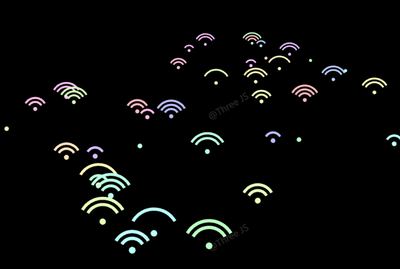
本案例演示 WiFi 效果:大批量相同几何体实例化渲染,降低 draw call;核心用到 onBeforeCompile、OrbitControls、InstancedMesh。建议先打开文首在线案例查看动态画面,再对照下方源码逐步理解。
核心概念
- Scene / Camera / WebGLRenderer 构成最小渲染闭环;大场景可开
logarithmicDepthBuffer缓解 Z-fighting。 - onBeforeCompile 在 Three 拼好内置 shader 后替换
#include <xxx>片段,适合在 PBR 材质上叠加大屏特效。 - OrbitControls 提供轨道旋转/缩放;开启
enableDamping后需在 animate 中controls.update()。
实现步骤
- 搭建 Scene、PerspectiveCamera、WebGLRenderer,挂载 canvas 并处理
resize - 定义 uniforms / onBeforeCompile 或 ShaderMaterial,编写 GLSL 与材质参数
- 创建 OrbitControls(及 Raycaster 等交互控件,若源码包含)
- 在
requestAnimationFrame循环中更新状态并 render(Cesium 为viewer.render或自动渲染)
代码要点
import * as THREE from "three";
import { OrbitControls } from "three/addons/controls/OrbitControls.js";
import { mergeGeometries } from 'three/examples/jsm/utils/BufferGeometryUtils.js'

class RadioSignals extends THREE.InstancedMesh {
	constructor(gu, camera, amount, colors = []) {
		const segs = 36;
		const offsets = [0.0625, 0.25 + 0.1875, 0.5 + 0.1875, 0.75 + 0.1875];
		const gs = offsets.map((offset, idx) => {
			const g = new THREE.PlaneGeometry(1, 0.125, segs, 1).translate(0, offset, 0);
			const count = g.attributes.position.count;
			const ts = Math.random() * 2;
			g.setAttribute("batchIndex", new THREE.Float32BufferAttribute(new Array(count).fill(idx), 1));
			return g;
		});
		const g = mergeGeometries(gs);
		g.setAttribute(
			"timeShift",
			new THREE.InstancedBufferAttribute(
				new Float32Array(Array.from({ length: amount }, () => Math.random() * 2)),
				1
			)
		);
		const material = new THREE.MeshBasicMaterial({
			onBeforeCompile: shader => {
				shader.uniforms.time = gu.time;
				shader.uniforms.bendAngle = this.uniforms.bendAngle;
				shader.vertexShader = `
                uniform float time;
                uniform float bendAngle;
                attribute float batchIndex;
                attribute float timeShift;
                mat2 rot(float a){
                float c = cos(a);
                float s = sin(a);
                return mat2(c, s, -s, c);
                }
                ${shader.vertexShader}
                            `.replace(
                                `#include <begin_vertex>`,
                                `#include <begin_vertex>
                float t = (time + timeShift) * PI2;
                bool notZero = batchIndex > 0.5;
                float a = notZero ? bendAngle : PI2;
                float r = position.y;
                transformed.xy = rot(a * -position.x) * vec2(0., r);

                if (notZero){
                    float fr = sin(mod((floor((r * 4.) - 0.25)) - t, PI2));
                    transformed *= step(0., fr);
                }`
				);
			}
		});
		super(g, material, amount);
		this.uniforms = { bendAngle: { value: (Math.PI * 2) / 3 } };
		this.items = Array.from({ length: amount }, (_, idx) => {
			const o = new THREE.Object3D();
			o.position.set(THREE.MathUtils.randInt(-10, 10), 0, THREE.MathUtils.randInt(-10, 10));
			o.updateMatrix();
			this.setMatrixAt(idx, o.matrix);
			const _color = new THREE.Color();
			if (Array.isArray(colors)) {
				if (colors.length !== amount) {
					console.warn("Amount of elements for colours is not equal to amount of instances. Randomness will be used.");
					_color.setHSL(Math.random(), 1, 0.75);
				} else {
					_color.set(colors[idx]);
				}
			}
			this.setColorAt(idx, _color);
			return o;
		});
		this.update = () => {
			this.items.forEach((o, idx) => {
				o.quaternion.copy(camera.quaternion);
				o.updateMatrix();
				this.setMatrixAt(idx, o.matrix);
			});
			this.instanceMatrix.needsUpdate = true;
		};
	}
}

let scene = new THREE.Scene();
let camera = new THREE.PerspectiveCamera(60, innerWidth / innerHeight, 1, 1000);
camera.position.set(0, 10, 10);
let renderer = new THREE.WebGLRenderer({ antialias: true });
renderer.setSize(innerWidth, innerHeight);
document.body.appendChild(renderer.domElement);
let controls = new OrbitControls(camera, renderer.domElement);
controls.enableDamping = true;
let gu = { time: { value: 0 }};
let radioSignals = new RadioSignals(gu, camera, 45);
scene.add(radioSignals);
const clock = new THREE.Clock();
renderer.setAnimationLoop(() => {
    gu.time.value = clock.getElapsedTime();
    controls.update();
    radioSignals.update();
    renderer.render(scene, camera);
});
完整源码:GitHub
小结
- 本文提供 WiFi 完整 Three.js 源码与在线 Demo,建议先运行案例再改 uniform/参数做二次实验
- 更多 Three.js 实战案例见 three-cesium-examples 合集 与 GitHub 开源仓库