海面 · Ocean Shader · ▶ 在线运行案例
案例合集: 三维可视化功能案例(threehub.cn)
开源仓库github地址: https://github.com/z2586300277/three-cesium-examples
**400个案例代码: ** 网盘链接
你将学到什么
- 官方
Water对象(examples/jsm/objects/Water.js) waterNormals法线贴图 + RepeatWrappinguniforms.time驱动波浪- lil-gui 调 waterColor / sunColor / sunDirection
效果说明
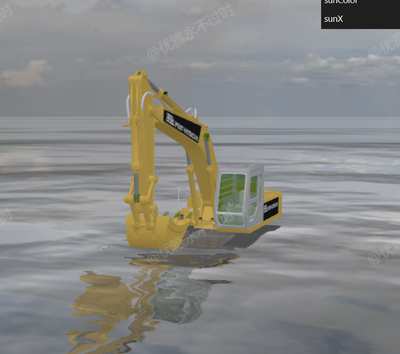
万级平面海面荡漾,天空盒反射;GLTF 挖掘机模型设 envMap 与环境一致;GUI 实时改水体与太阳参数。
核心概念
import { Water } from 'three/examples/jsm/objects/Water.js';

const water = new Water(waterGeometry, {
    textureWidth: 512,
    textureHeight: 512,
    waterNormals: new THREE.TextureLoader().load('waternormals.jpg', t => {
        t.wrapS = t.wrapT = THREE.RepeatWrapping;
    }),
    sunDirection: new THREE.Vector3(),
    sunColor: 0xffffff,
    waterColor: 0x001e0f,
    distortionScale: 3.7,
    fog: scene.fog !== undefined,
});
water.rotation.x = -Math.PI / 2;
动画
water.material.uniforms['time'].value += 1.0 / 60.0;
每帧递增 time,Water 内部 shader 算法线偏移与反射。
GUI
gui.addColor(water.material.uniforms['waterColor'], 'value');
gui.add(water.material.uniforms['sunDirection'].value, 'x', -1, 1);
实现步骤
- PlaneGeometry 10000×10000 创建 Water
- CubeTexture 天空盒 → background + 模型 envMap
- GLTFLoader 加载场景模型
- animate 更新 time + controls + render
代码要点
import * as THREE from 'three'
import { OrbitControls } from 'three/examples/jsm/controls/OrbitControls.js'
import { Water } from 'three/examples/jsm/objects/Water.js';
import { GUI } from 'three/examples/jsm/libs/lil-gui.module.min.js'
import { GLTFLoader } from 'three/examples/jsm/loaders/GLTFLoader.js'

const box = document.getElementById('box')

const scene = new THREE.Scene()

const camera = new THREE.PerspectiveCamera(50, box.clientWidth / box.clientHeight, 0.1, 1000000)

camera.position.set(6, 3, 15)

const renderer = new THREE.WebGLRenderer({ antialias: true, alpha: true, logarithmicDepthBuffer: true })

renderer.setSize(box.clientWidth, box.clientHeight)

box.appendChild(renderer.domElement)

const controls = new OrbitControls(camera, renderer.domElement)

controls.enableDamping = true

const waterGeometry = new THREE.PlaneGeometry(10000, 10000);

const water = new Water(
    waterGeometry,
    {
        textureWidth: 512,
        textureHeight: 512,
        waterNormals: new THREE.TextureLoader().load(  FILE_HOST +  '/images/texture/waternormals.jpg', function (texture) {

            texture.wrapS = texture.wrapT = THREE.RepeatWrapping;

        }),
        sunDirection: new THREE.Vector3(),
        sunColor: 0xffffff,
        waterColor: 0x001e0f,
        distortionScale: 3.7,
        fog: scene.fog !== undefined
    }
);

water.rotation.x = - Math.PI / 2;

scene.add(water);

// 文件地址
const urls = [0, 1, 2, 3, 4, 5].map(k => (FILE_HOST + 'files/sky/skyBox0/' + (k + 1) + '.png'));

const textureCube = new THREE.CubeTextureLoader().load(urls);

scene.background = textureCube;

new GLTFLoader().load('https://z2586300277.github.io/3d-file-server/models/glb/wajueji.glb',

    gltf => {

        gltf.scene.traverse(child => {

            if (child.isMesh) {

                child.material.envMap = textureCube

            }

        })

        scene.add(gltf.scene)

    }

)

const gui = new GUI();

gui.addColor(water.material.uniforms['waterColor'], 'value').name('waterColor');

gui.addColor(water.material.uniforms['sunColor'], 'value').name('sunColor');

gui.add(water.material.uniforms['sunDirection'].value, 'x', - 1, 1).name('sunX');

animate()

function animate() {

    water.material.uniforms['time'].value += 1.0 / 60.0;

    requestAnimationFrame(animate)

    controls.update()

    renderer.render(scene, camera)

}

window.onresize = () => {

    renderer.setSize(box.clientWidth, box.clientHeight)

    camera.aspect = box.clientWidth / box.clientHeight

    camera.updateProjectionMatrix()

}
完整源码:GitHub
小结
- 本文提供 海面 完整 Three.js 源码与在线 Demo,建议先运行案例再改 uniform/参数做二次实验
- 更多 Three.js 实战案例见 three-cesium-examples 合集 与 GitHub 开源仓库