网格地板 · Gird Floor · ▶ 在线运行案例
案例合集: 三维可视化功能案例(threehub.cn)
开源仓库github地址: https://github.com/z2586300277/three-cesium-examples
**400个案例代码: ** 网盘链接
你将学到什么
- ShaderMaterial 自定义着色器实现核心视觉效果
- OrbitControls 相机轨道交互
- 场景雾效增强纵深
requestAnimationFrame渲染循环与resize自适应
效果说明
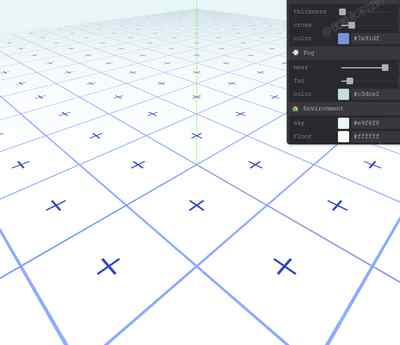
本案例演示 网格地板 效果:基于 WebGL 实现「网格地板」可视化效果,附完整可运行源码;核心用到 ShaderMaterial、OrbitControls、场景雾效增强纵深。建议先打开文首在线案例查看动态画面,再对照下方源码逐步理解。
核心概念
- Scene / Camera / WebGLRenderer 构成最小渲染闭环;大场景可开
logarithmicDepthBuffer缓解 Z-fighting。 - ShaderMaterial 通过
uniforms+ 自定义 GLSL 控制逐像素/逐点效果;透明粒子常配合depthTest: false。 - OrbitControls 提供轨道旋转/缩放;开启
enableDamping后需在 animate 中controls.update()。
实现步骤
- 搭建 Scene、PerspectiveCamera、WebGLRenderer,挂载 canvas 并处理
resize - 定义 uniforms / onBeforeCompile 或 ShaderMaterial,编写 GLSL 与材质参数
- 创建 OrbitControls(及 Raycaster 等交互控件,若源码包含)
- 在
requestAnimationFrame循环中更新状态并 render(Cesium 为viewer.render或自动渲染)
代码要点
import * as THREE from 'three'
import { OrbitControls } from 'three/examples/jsm/controls/OrbitControls.js'
import { Pane } from 'tweakpane'

const baseVertexShader = `#include <fog_pars_vertex>

varying vec2 vUv;

void main()
{
    gl_Position = projectionMatrix * modelViewMatrix * vec4(position, 1.0);

    vUv = uv;

    #include <begin_vertex>
    #include <project_vertex>
    #include <fog_vertex>
}`


const baseFragmentShader = `#include <fog_pars_fragment>

uniform float uGridThickness;
uniform vec3 uGridColor;
uniform float uCrossScale;
uniform float uCrossThickness;
uniform float uCross;
uniform vec3 uCrossColor;
uniform vec3 uFloorColor;

varying vec2 vUv;

float gridFloor(vec2 uv, vec2 lineWidth) {
    //💡 derivatives of original uv
    //   to create anti-aliasing line with smoothstep
    // how much a specific value is changing between one pixel and the next
    // width change depending on angle & distance from camera can be found with space partial derivatives
    // fwidth - approximation of derivatives
    //float lineAA = fwidth(uv.x);
    // vec2 uvDeriv = fwidth(uv);
    vec4 uvDDXY = vec4(dFdx(uv), dFdy(uv));
    vec2 uvDeriv = vec2(length(uvDDXY.xz), length(uvDDXY.yw));

    // 💡 Invert Line Trick
    // since 0.5 clamp was use, to handle line thickness > 0.5
    // draw black lines on white offset by half a grid width
    bool invertLine = lineWidth.x > 0.5;
    vec2 targetWidth = invertLine ? 1.0 - lineWidth : lineWidth;

    // 💡 Phone-wire AA
    // STEP 1: ensure line does not get smaller than one pixel
    // if so, we will clamp it to one pixel
    // vec2 drawWidth = max(uvDeriv, lineWidth);
    // clamp to 0.5 to ensure line fades to grey, not black
    vec2 drawWidth = clamp(targetWidth, uvDeriv, vec2(0.5));

    // 💡 1 pixel wide smoothstep can be too sharp causing aliasing
    // hence using 1.5 pixel wide smoothstep
    // AA - anti-aliasing
    vec2 lineAA = uvDeriv * 1.5;

    //💡 prepare uv for lines
    // 0-1(uv) 👉 0-2(multiply) 👉 -1-0-1(shift) 👉 1-0-1(absolute)
    // 👉 0-1-0(shift) make white at center(0,0) position
    // (fract) - make sawtooth wave
    //float lineUV = 1.0 - abs(fract(uv.x) * 2.0 - 1.0);
    vec2 gridUV = abs(fract(uv) * 2.0 - 1.0);
    gridUV = invertLine ? gridUV : 1.0 - gridUV;

    //💡 repeating lines
    // use the derivative to make the lines smooth
    //float line = smoothstep(lineWidth.x + lineAA, lineWidth.x - lineAA,lineUV);
    vec2 grid2 = smoothstep(drawWidth + lineAA, drawWidth - lineAA, gridUV);

    // 💡 Phone-wire AA
    // STEP 2: fades the line out as it gets thinner
    // how thick we want divided by how thick we’re drawing
    grid2 *= clamp(targetWidth / drawWidth, 0.0, 1.0);

    // 💡 Moire Suppresion
    // grid cells < a pixel(when derivative > 1.0), moire pattern can appear
    // note: after the 0.5 clamp, moire would be more pronounced, but in my case, i do not see any moire
    // fade to solid color when 0.5 > derivative > 1.0
    // anti-aliased lines start to merge
    grid2 = mix(grid2, targetWidth, clamp(uvDeriv * 2.0 - 1.0, 0.0, 1.0));
    grid2 = invertLine ? 1.0 - grid2 : grid2;

    // overlap xy lines
    float grid = mix(grid2.x, 1.0, grid2.y);

    return grid;
}

float crossFloor(vec2 uv, float scale, float thickness, float crossIntensity) {
    vec2 lineWidth = vec2(thickness);

    //💡 derivatives of original uv
    //   to create anti-aliasing line with smoothstep
    // how much a specific value is changing between one pixel and the next
    // width change depending on angle & distance from camera can be found with space partial derivatives
    // fwidth - approximation of derivatives
    //float lineAA = fwidth(uv.x);
    // vec2 uvDeriv = fwidth(uv);
    vec4 uvDDXY = vec4(dFdx(uv), dFdy(uv));
    vec2 uvDeriv = vec2(length(uvDDXY.xz), length(uvDDXY.yw));

    // 💡 Invert Line Trick
    // since 0.5 clamp was use, to handle line thickness > 0.5
    // draw black lines on white offset by half a grid width
    bool invertLine = lineWidth.x > 0.5;
    // vec2 targetWidth = invertLine ? 1.0 - lineWidth : lineWidth;
    vec2 targetWidth = lineWidth;

    // 💡 Phone-wire AA
    // STEP 1: ensure line does not get smaller than one pixel
    // if so, we will clamp it to one pixel
    // vec2 drawWidth = max(uvDeriv, lineWidth);
    // clamp to 0.5 to ensure line fades to grey, not black
    vec2 drawWidth = clamp(targetWidth, uvDeriv, vec2(0.5));

    // 💡 1 pixel wide smoothstep can be too sharp causing aliasing
    // hence using 1.5 pixel wide smoothstep
    // AA - anti-aliasing
    vec2 lineAA = uvDeriv * 1.5;

    // Cross Intensity
    float cutOffX = abs(fract(uv.y) * 2.0 - 1.0) > crossIntensity ? 1.0 : 0.0;
    float cutOffY = abs(fract(uv.x) * 2.0 - 1.0) > crossIntensity ? 1.0 : 0.0;

    //💡 prepare uv for lines
    // 0-1(uv) 👉 0-2(multiply) 👉 -1-0-1(shift) 👉 1-0-1(absolute)
    // 👉 0-1-0(shift) make white at center(0,0) position
    // (fract) - make sawtooth wave
    //float lineUV = 1.0 - abs(fract(uv.x) * 2.0 - 1.0);
    // vec2 gridUV = abs(fract(uv) * 2.0 - 1.0);
    // UV
    float uvX = abs(fract(uv.x) * 2.0 - 1.0) + cutOffX;
    float uvY = abs(fract(uv.y) * 2.0 - 1.0) + cutOffY;
    vec2 gridUV = vec2(uvX, uvY);

    // gridUV = invertLine ? gridUV : 1.0 - gridUV;

    //💡 repeating lines
    // use the derivative to make the lines smooth
    //float line = smoothstep(lineWidth.x + lineAA, lineWidth.x - lineAA,lineUV);
    vec2 grid2 = smoothstep(drawWidth + lineAA, drawWidth - lineAA, gridUV);

    // 💡 Phone-wire AA
    // STEP 2: fades the line out as it gets thinner
    // how thick we want divided by how thick we’re drawing
    grid2 *= clamp(targetWidth / drawWidth, 0.0, 1.0);

    // 💡 Moire Suppresion
    // grid cells < a pixel(when derivative > 1.0), moire pattern can appear
    // note: after the 0.5 clamp, moire would be more pronounced, but in my case, i do not see any moire
    // fade to solid color when 0.5 > derivative > 1.0
    // anti-aliased lines start to merge
    grid2 = mix(grid2, targetWidth, clamp(uvDeriv * 2.0 - 1.0, 0.0, 1.0));
    // grid2 = invertLine ? 1.0 - grid2 : grid2;

    // overlap xy lines
    float grid = mix(grid2.x, 1.0, grid2.y);

    return grid;
}

void main()
{
    vec2 lineWidth = vec2(uGridThickness);
    //💡 scaling uv to get multiple repeating lines
    vec2 uv = vUv * 20.0;

    // grid floor
    float grid = gridFloor(uv, lineWidth);
    // mix with floor color
    vec3 gridColor = mix(uFloorColor, uGridColor, vec3(grid));

    // cross grid
    float crossUv = crossFloor(uv, uCrossScale, uCrossThickness, uCross);
    // 💡 to add more grids on top, ensure the base is taken from previous gridColor
    vec3 gridColor2 = mix(gridColor, uCrossColor, vec3(crossUv));

    vec3 color =  gridColor2;

    gl_FragColor = vec4(color, 1.0);

    #include <fog_fragment>
}`

const gui = new Pane()

const debugObject = {
    color: '#c4d6ff',
    crossColor: '#7a91df',
    fogColor: '#c3dce2',
    backgroundColor: '#e9f6f8',
    floorColor: '#ffffff',
}

// Canvas
const box = document.querySelector('#box')

// Scene
const scene = new THREE.Scene()

/**
 * Test mesh
 */
// Geometry
const geometry = new THREE.PlaneGeometry(10, 10, 32, 32)

// Material
const material = new THREE.ShaderMaterial({
    vertexShader: baseVertexShader,
    fragmentShader: baseFragmentShader,
    side: THREE.DoubleSide,
    transparent: true,
    uniforms: {
        // Floor
        uFloorColor: { value: new THREE.Color(debugObject.floorColor) },

        // Grid
        uGridThickness: { value: 0.02 },
        uGridColor: { value: new THREE.Color(debugObject.color) },

        // Cross
        uCrossThickness: { value: 0.02 },
        uCross: { value: 0.2 },
        uCrossColor: { value: new THREE.Color(debugObject.crossColor) },

        // Fog
        fogColor: { value: new THREE.Color(debugObject.fogColor) },
        fogNear: { value: 1 },
        fogFar: { value: 5 },
    },
    fog: true,
})

const gridFolder = gui.addFolder({ title: '🌐 Grid Floor' })
gridFolder.addBinding(material.uniforms.uGridThickness, 'value', {
    label: 'thickness',
    min: 0,
    max: 1,
    step: 0.001,
})
gridFolder
    .addBinding(debugObject, 'color', {
        label: 'color',
    })
    .on('change', () => {
        material.uniforms.uGridColor.value.set(debugObject.color)
    })

const crossFolder = gui.addFolder({ title: '❎ Cross Floor' })
crossFolder.addBinding(material.uniforms.uCrossThickness, 'value', {
    label: 'thickness',
    min: 0,
    max: 1,
    step: 0.001,
})
crossFolder.addBinding(material.uniforms.uCross, 'value', {
    label: 'cross',
    min: 0,
    max: 1,
    step: 0.01,
})
crossFolder
    .addBinding(debugObject, 'crossColor', {
        label: 'color',
    })
    .on('change', () => {
        material.uniforms.uCrossColor.value.set(debugObject.crossColor)
    })

// Grid Floor
const gridFloor = new THREE.Mesh(geometry, material)
gridFloor.rotation.x = Math.PI * 0.5
scene.add(gridFloor)

// Fog
// color, density
scene.fog = new THREE.Fog(debugObject.fogColor, 1, 10)
scene.background = new THREE.Color(debugObject.backgroundColor)

const fogFolder = gui.addFolder({ title: '💨 Fog' })

fogFolder.addBinding(scene.fog, 'near', {
    label: 'near',
    min: -5,
    max: 2,
    step: 0.1,
})
fogFolder.addBinding(scene.fog, 'far', {
    label: 'far',
    min: 2,
    max: 50,
    step: 0.1,
})
fogFolder
    .addBinding(debugObject, 'fogColor', {
        label: 'color',
    })
    .on('change', () => {
        scene.fog.color.set(debugObject.fogColor)
    })

const envFolder = gui.addFolder({ title: '🏡 Environment' })
envFolder
    .addBinding(debugObject, 'backgroundColor', {
        label: 'sky',
    })
    .on('change', () => {
        scene.background = new THREE.Color(debugObject.backgroundColor)
    })

envFolder
    .addBinding(debugObject, 'floorColor', {
        label: 'Floor',
    })
    .on('change', () => {
        material.uniforms.uFloorColor.value.set(debugObject.floorColor)
    })

// Axes helper
const axesHelper = new THREE.AxesHelper(3)
scene.add(axesHelper)

/**
 * Sizes
 */
const sizes = {
    width: window.innerWidth,
    height: window.innerHeight,
}

window.addEventListener('resize', () => {
    // Update sizes
    sizes.width = window.innerWidth
    sizes.height = window.innerHeight

    // Update camera
    camera.aspect = sizes.width / sizes.height
    camera.updateProjectionMatrix()

    // Update renderer
    renderer.setSize(sizes.width, sizes.height)
    renderer.setPixelRatio(Math.min(window.devicePixelRatio, 2))
})

/**
 * Camera
 */
// Base camera
const camera = new THREE.PerspectiveCamera(
    75,
    sizes.width / sizes.height,
    0.1,
    50
)
camera.position.set(1, 1, 1)
scene.add(camera)


/**
 * Renderer
 */
const renderer = new THREE.WebGLRenderer({})
renderer.setSize(sizes.width, sizes.height)
renderer.setPixelRatio(Math.min(window.devicePixelRatio, 2))
box.appendChild(renderer.domElement)

// Controls
const controls = new OrbitControls(camera, renderer.domElement)
controls.enableDamping = true
controls.minDistance = 0.5
controls.maxDistance = 15

/**
 * Animate
 */
const tick = () => {
    // Update controls
    controls.update()

    // Render
    renderer.render(scene, camera)

    // Call tick again on the next frame
    window.requestAnimationFrame(tick)
}

tick()
完整源码:GitHub
小结
- 本文提供 网格地板 完整 Three.js 源码与在线 Demo,建议先运行案例再改 uniform/参数做二次实验
- 更多 Three.js 实战案例见 three-cesium-examples 合集 与 GitHub 开源仓库