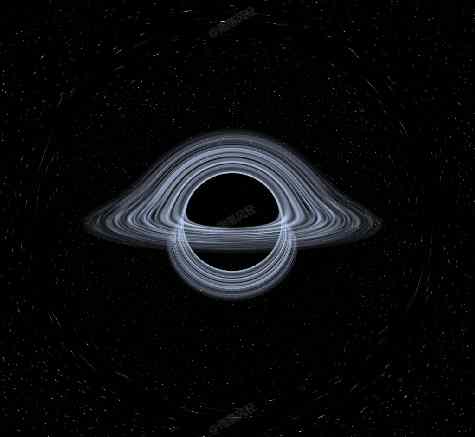
黑洞 · Black Hole · ▶ 在线运行案例
案例合集: 三维可视化功能案例(threehub.cn)
开源仓库github地址: https://github.com/z2586300277/three-cesium-examples
**400个案例代码: ** 网盘链接
你将学到什么
- RawShaderMaterial 手写顶点/片元着色器
- OrbitControls 相机轨道交互
- Canvas 动态纹理贴图
requestAnimationFrame渲染循环与resize自适应
效果说明
本案例演示 黑洞 效果:用 Canvas 2D 绘制内容并实时映射为 Three.js 纹理;核心用到 RawShaderMaterial、OrbitControls、Canvas。建议先打开文首在线案例查看动态画面,再对照下方源码逐步理解。
核心概念
- ShaderMaterial 通过
uniforms+ 自定义 GLSL 控制逐像素/逐点效果;透明粒子常配合depthTest: false。 - OrbitControls 提供轨道旋转/缩放;开启
enableDamping后需在 animate 中controls.update()。 - CanvasTexture 每帧或按需把 2D Canvas 内容上传 GPU,适合动态文字、图表、视频帧贴图。
实现步骤
- 创建 OrbitControls 并处理 resize
- 定义 uniforms,在 rAF 中更新并 render
- composer.addPass 串联后处理
- gui.add 绑定可调参数
代码要点
import * as THREE from "three";
import { OrbitControls } from "three/examples/jsm/controls/OrbitControls.js";
import { FullScreenQuad } from "three/examples/jsm/postprocessing/Pass.js";
import { GUI } from "dat.gui";

const canvas = document.createElement("canvas");
canvas.style.width = "100vw !important";
canvas.style.height = "100vh !important";
document.body.appendChild(canvas);

const renderer = new THREE.WebGLRenderer({ canvas: canvas, antialias: true, alpha: true });

const camera = new THREE.PerspectiveCamera(90, 1, 0.1, 1000);
camera.position.set(0, 3, 10);

const controls = new OrbitControls(camera, canvas);
controls.enableDamping = true;
controls.maxDistance = 25;

const material = new THREE.RawShaderMaterial({
  glslVersion: THREE.GLSL3,
  uniforms: {
    // 黑洞参数
    hole: {
      value: {
        // 位置
        pos: new THREE.Vector3(0, 0, 0),
        // 史瓦西半径,与引力强度有关
        rs: 0.05,
      },
    },
    // 相机参数
    camera: {
      value: {
        pos: new THREE.Vector3(),
        // 世界矩阵
        world: new THREE.Matrix4(),
        // 投影矩阵
        proj_inv: new THREE.Matrix4(),
      },
    },
    max_steps: { value: 1000 },
    step_size: { value: 0.03 },
    time: { value: 0.0 },
    resolution: {
      value: new THREE.Vector2(),
    },
    color: { value: new THREE.Color(0xe0eaff) },
  },

  vertexShader: /* glsl */ `
    precision highp float;
    precision highp int;
    precision highp sampler2D;

    struct Hole {
      vec3 pos;
      float rs;
    };

    struct Camera {
      vec3 pos;
      mat4 world;
      mat4 proj_inv;
    };

    uniform  Hole    hole    ;
    uniform  Camera  camera  ;

    in  vec3  position  ;
    in  vec2  uv        ;

    smooth  out  vec3  V_pos   ; // 片元在世界坐标系中的位置

    void main() {
      // 从投影矩阵还原光线投射平面的坐标
      // ndc
      vec4 pos_vert = vec4((uv - 0.5) * 2.0, -1.0, 1.0);
      // view
      pos_vert = camera.proj_inv * pos_vert;
      pos_vert /= pos_vert.w;
      // world
      pos_vert.w = 1.0;
      pos_vert = camera.world * pos_vert;

      V_pos = pos_vert.xyz;

      gl_Position = vec4(position, 1.0);
    }
  `,

  fragmentShader: /* glsl */ `
    precision highp float;
    precision highp int;
    precision highp sampler2D;

    #define pi 3.141592653589793

    struct Hole {
      vec3 pos;
      float rs;
    };

    struct Camera {
      vec3 pos;
      mat4 world;
      mat4 proj_inv;
    };

    struct Ray {
      vec3 pos;
      vec3 dir;
      float d;
    };

    uniform  Hole       hole        ;
    uniform  Camera     camera      ;
    uniform  uint       max_steps   ;
    uniform  float      step_size   ;
    uniform  float      time        ;
    uniform  vec2       resolution  ;
    uniform  vec3       color       ;

    smooth  in  vec3  V_pos  ;

    layout(location = 0) out vec4 c_out;

    // 引力加速度
    vec3 a(in Ray ray) {
      vec3 dir = normalize(hole.pos - ray.pos);
      float strength = hole.rs / (ray.d * ray.d) * 0.4 + abs(dot(ray.dir, dir)) * 0.001;
      return dir * strength;
    }

    float CubicInterpolate(float x) {
      return 3.0 * pow(x, 2.0) - 2.0 * pow(x, 3.0);
    }

    float PerlinNoise(vec3 Position) {
      vec3 PosInt = floor(Position);
      vec3 PosFloat = fract(Position);

      float Sx = CubicInterpolate(PosFloat.x);
      float Sy = CubicInterpolate(PosFloat.y);
      float Sz = CubicInterpolate(PosFloat.z);

      float v000 = 2.0 * fract(sin(dot(vec3(PosInt.x, PosInt.y, PosInt.z), vec3(12.9898, 78.233, 213.765))) * 43758.5453) - 1.0;
      float v100 = 2.0 * fract(sin(dot(vec3(PosInt.x + 1.0, PosInt.y, PosInt.z), vec3(12.9898, 78.233, 213.765))) * 43758.5453) - 1.0;
      float v010 = 2.0 * fract(sin(dot(vec3(PosInt.x, PosInt.y + 1.0, PosInt.z), vec3(12.9898, 78.233, 213.765))) * 43758.5453) - 1.0;
      float v110 = 2.0 * fract(sin(dot(vec3(PosInt.x + 1.0, PosInt.y + 1.0, PosInt.z), vec3(12.9898, 78.233, 213.765))) * 43758.5453) - 1.0;
      float v001 = 2.0 * fract(sin(dot(vec3(PosInt.x, PosInt.y, PosInt.z + 1.0), vec3(12.9898, 78.233, 213.765))) * 43758.5453) - 1.0;
      float v101 = 2.0 * fract(sin(dot(vec3(PosInt.x + 1.0, PosInt.y, PosInt.z + 1.0), vec3(12.9898, 78.233, 213.765))) * 43758.5453) - 1.0;
      float v011 = 2.0 * fract(sin(dot(vec3(PosInt.x, PosInt.y + 1.0, PosInt.z + 1.0), vec3(12.9898, 78.233, 213.765))) * 43758.5453) - 1.0;
      float v111 = 2.0 * fract(sin(dot(vec3(PosInt.x + 1.0, PosInt.y + 1.0, PosInt.z + 1.0), vec3(12.9898, 78.233, 213.765))) * 43758.5453) - 1.0;

      return mix(mix(mix(v000, v100, Sx), mix(v010, v110, Sx), Sy), mix(mix(v001, v101, Sx), mix(v011, v111, Sx), Sy), Sz);
    }

    vec4 hash43x(vec3 p) {
      uvec3 x = uvec3(ivec3(p));
      x = 1103515245U * ((x.xyz >> 1U) ^ (x.yzx));
      uint h = 1103515245U * ((x.x ^ x.z) ^ (x.y >> 3U));
      uvec4 rz = uvec4(h, h * 16807U, h * 48271U, h * 69621U);
      return vec4((rz >> 1) & uvec4(0x7fffffffU)) / float(0x7fffffff);
    }

    // 星空背景
    vec3 stars(vec3 p) {
      vec3 col = vec3(0);
      float rad = .087 * resolution.y;
      float dens = 0.15;
      float id = 0.;
      float rz = 0.;
      float z = 1.;

      for(float i = 0.; i < 5.; i++) {
        p *= mat3(0.86564, -0.28535, 0.41140, 0.50033, 0.46255, -0.73193, 0.01856, 0.83942, 0.54317);
        vec3 q = abs(p);
        vec3 p2 = p / max(q.x, max(q.y, q.z));
        p2 *= rad;
        vec3 ip = floor(p2 + 1e-5);
        vec3 fp = fract(p2 + 1e-5);
        vec4 rand = hash43x(ip * 283.1);
        vec3 q2 = abs(p2);
        vec3 pl = 1.0 - step(max(q2.x, max(q2.y, q2.z)), q2);
        vec3 pp = fp - ((rand.xyz - 0.5) * .6 + 0.5) * pl;
        float pr = length(ip) - rad;
        if(rand.w > (dens - dens * pr * 0.035))
          pp += 1e6;

        float d = dot(pp, pp);
        d /= pow(fract(rand.w * 172.1), 32.) + .25;
        float bri = dot(rand.xyz * (1. - pl), vec3(1));
        id = fract(rand.w * 101.);
        col += bri * z * .00009 / pow(d + 0.025, 3.0) * (mix(vec3(1.0, 0.45, 0.1), vec3(0.75, 0.85, 1.), id) * 0.6 + 0.4);

        rad = floor(rad * 1.08);
        dens *= 1.45;
        z *= 0.6;
        p = p.yxz;
      }

      return col;
    }

    // 颜色混合
    void blend(inout vec4 c_0, in vec4 c_1) {
      c_0.rgb = mix(c_0.rgb, c_1.rgb, 1.0 - c_0.a);
      c_0.a = c_0.a + c_1.a * (1.0 - c_0.a);
    }

    void main() {
      Ray ray_now, ray_new;

      // 从投射面出发,反向光线追踪的初始状态
      ray_now.pos = V_pos;
      ray_now.dir = normalize(V_pos - camera.pos);
      ray_now.d = length(V_pos - hole.pos);

      c_out = vec4(0.0);

      // 步进追踪
      for (uint i = 0u; i < max_steps; i++) {
        vec3 a = a(ray_now);

        ray_new.pos = ray_now.pos + ray_now.dir * step_size;
        ray_new.dir = normalize(ray_now.dir + a);
        ray_new.d = length(ray_new.pos - hole.pos);

        // 此次步进穿过了 y=0 平面,考虑吸积盘
        if (ray_now.pos.y * ray_new.pos.y < 0.0) {
          // 补间出与 y=0 平面的交点
          vec3 p = mix(ray_now.pos, ray_new.pos, -ray_now.pos.y / (ray_new.pos.y - ray_now.pos.y));

          float d = length(p - hole.pos);

          if (d < hole.rs * 110.0 && d > hole.rs * 15.0) {
            vec4 c_0 = vec4(color, 0.0);
            vec4 c_1 = vec4(color, 1.0);

            // 换算到极坐标拉伸
            float angle = abs(
              mod(
                atan(p.z - hole.pos.z, p.x - hole.pos.x) + pi + time * 1.3,
                2.0 * pi
              ) - pi
            );
            vec2 uv = vec2(angle * d * 0.5, d * 13.0 + time * 0.5);

            // 获取噪声强度并应用修正
            float s = PerlinNoise(vec3(uv, 0.0)) * 0.5 + 0.5;
            s *= 1.0 - pow((d - hole.rs * 15.0) / (hole.rs * 95.0), 2.4);

            vec4 c = mix(c_0, c_1, s);
            blend(c_out, c);
          }
        }

        ray_now = ray_new;

        // 光子球(1.5倍史瓦西半径)内的光子无法逃逸黑洞
        if (ray_now.d < hole.rs * 1.5) {
          c_out.rgb *= c_out.a;
          c_out.a = 1.0;
        }

        if (c_out.a > 0.99) {
          break;
        }
      }

      if (c_out.a < 0.99) {
        blend(c_out, vec4(stars(ray_now.dir), 1.0));
      }
    }
  `,
});

const quad = new FullScreenQuad(material);

const timer = new THREE.Timer();

const tick = (delta, elapsed) => {
  controls.update(delta);

  material.uniforms.time.value = elapsed;
  // material.uniforms.hole.value.pos.copy(hole.position);
  material.uniforms.camera.value.pos.copy(camera.position);
  material.uniforms.camera.value.world.copy(camera.matrixWorld);
};

const render = () => {
  quad.render(renderer);
};

const ani = () => {
  const elapsed = timer.getElapsed();
  const delta = timer.getDelta();

  timer.update();

  tick(delta, elapsed);
  render();

  requestAnimationFrame(ani);
};

const data = {
  get rs() {
    return material.uniforms.hole.value.rs;
  },
  set rs(v) {
    material.uniforms.hole.value.rs = v;
  },

  get max_steps() {
    return material.uniforms.max_steps.value;
  },
  set max_steps(v) {
    material.uniforms.max_steps.value = v;
  },

  get step_size() {
    return material.uniforms.step_size.value;
  },
  set step_size(v) {
    material.uniforms.step_size.value = v;
  },

  get color() {
    return `#${material.uniforms.color.value.getHexString()}`;
  },
  set color(v) {
    material.uniforms.color.value.set(v);
  },
};
const gui = new GUI();
gui.add(data, "rs", 0.02, 0.1, 0.001).name("史瓦西半径");
gui.add(data, "max_steps", 500, 2000, 1).name("最大步进步数");
gui.add(data, "step_size", 0.005, 0.05, 0.0001).name("步进步长");
gui.addColor(data, "color").name("颜色");

new ResizeObserver(() => {
  const rect = document.body.getBoundingClientRect();
  const w = rect.width;
  const h = rect.height;
  const a = w / h;
  const dpr = window.devicePixelRatio;

  renderer.setSize(w, h, false);
  renderer.setPixelRatio(dpr);

  camera.aspect = a;
  camera.updateProjectionMatrix();

  material.uniforms.resolution.value.set(w, h);
  material.uniforms.camera.value.proj_inv.copy(camera.projectionMatrixInverse);
}).observe(document.body);

ani();
完整源码:GitHub
小结
- 本文提供 黑洞 完整 Three.js 源码与在线 Demo,建议先运行案例再改 uniform/参数做二次实验
- 更多 Three.js 实战案例见 three-cesium-examples 合集 与 GitHub 开源仓库