粒子混合着色器 · BlendShader · ▶ 在线运行案例
案例合集: 三维可视化功能案例(threehub.cn)
开源仓库github地址: https://github.com/z2586300277/three-cesium-examples
**400个案例代码: ** 网盘链接
你将学到什么
- ShaderMaterial 自定义着色器实现核心视觉效果
- OrbitControls 相机轨道交互
- THREE.Points 粒子点渲染
- BufferGeometry 自定义顶点/索引数据
requestAnimationFrame渲染循环与resize自适应
效果说明
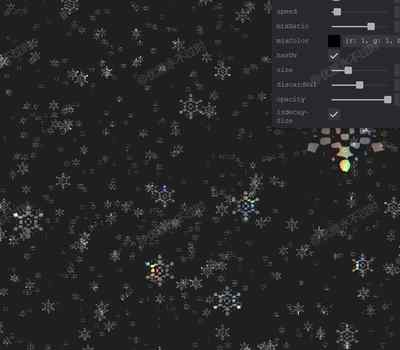
本案例演示 粒子混合着色器 效果:基于 WebGL 实现「粒子混合着色器」可视化效果,附完整可运行源码;核心用到 ShaderMaterial、OrbitControls、THREE.Points。建议先打开文首在线案例查看动态画面,再对照下方源码逐步理解。
核心概念
- Scene / Camera / WebGLRenderer 构成最小渲染闭环;大场景可开
logarithmicDepthBuffer缓解 Z-fighting。 - ShaderMaterial 通过
uniforms+ 自定义 GLSL 控制逐像素/逐点效果;透明粒子常配合depthTest: false。 - OrbitControls 提供轨道旋转/缩放;开启
enableDamping后需在 animate 中controls.update()。 - THREE.Points 将每个顶点渲染为可控大小的粒子;可用自定义 attribute(如
u_index)驱动片元/顶点动画。
实现步骤
- 搭建 Scene、PerspectiveCamera、WebGLRenderer,挂载 canvas 并处理
resize - 定义 uniforms / onBeforeCompile 或 ShaderMaterial,编写 GLSL 与材质参数
- 创建 OrbitControls(及 Raycaster 等交互控件,若源码包含)
- 在
requestAnimationFrame循环中更新状态并 render(Cesium 为viewer.render或自动渲染)
代码要点
import * as THREE from 'three'
import { OrbitControls } from 'three/examples/jsm/controls/OrbitControls.js'
import { Pane } from 'tweakpane'

const DOM = document.getElementById('box')

const scene = new THREE.Scene()

const camera = new THREE.PerspectiveCamera(50, DOM.clientWidth / DOM.clientHeight, 0.1, 1000)

camera.position.set(0, 10, 10)

const renderer = new THREE.WebGLRenderer({ antialias: true, alpha: true, logarithmicDepthBuffer: true })

renderer.setSize(DOM.clientWidth, DOM.clientHeight)

DOM.appendChild(renderer.domElement)

const controls = new OrbitControls(camera, renderer.domElement)

controls.enableDamping = true

// 粒子参数
const parameters = {

    particlesSum: 100000,

    inner: 0,

    outer: 1500,

    maxVelocity: 30,

    mapUrl: 'https://z2586300277.github.io/three-editor/dist/files/channels/snow.png',

    sportType: '全随机',

}

// 几何参数
const positions = new Float32Array(parameters.particlesSum * 3);

const velocities = new Float32Array(parameters.particlesSum * 3);

const setVelocities = {

    '全随机': (i) => {

        velocities[i * 3] += (Math.random() - 0.5) * parameters.maxVelocity / 1000

        velocities[i * 3 + 1] += (Math.random() - 0.5) * parameters.maxVelocity / 1000

        velocities[i * 3 + 2] += (Math.random() - 0.5) * parameters.maxVelocity / 1000

    },

    '随机向上': (i) => {

        velocities[i * 3] += (Math.random() - 0.5) * parameters.maxVelocity / 1000

        velocities[i * 3 + 1] += Math.abs((Math.random() - 0.5) * parameters.maxVelocity / 100000)

        velocities[i * 3 + 2] += (Math.random() - 0.5) * parameters.maxVelocity / 1000

    },

    '随机向下': (i) => {

        velocities[i * 3] += (Math.random() - 0.5) * parameters.maxVelocity / 1000

        velocities[i * 3 + 1] -= Math.abs((Math.random() - 0.5) * parameters.maxVelocity / 100000)

        velocities[i * 3 + 2] += (Math.random() - 0.5) * parameters.maxVelocity / 1000

    },

    '直线匀速向上': (i) => {

        velocities[i * 3] = 0

        velocities[i * 3 + 1] += parameters.maxVelocity / 2 / 100000

        velocities[i * 3 + 2] = 0

    },

    '直线匀速向下': (i) => {

        velocities[i * 3] = 0

        velocities[i * 3 + 1] -= parameters.maxVelocity / 2 / 100000

        velocities[i * 3 + 2] = 0

    }

}[parameters.sportType]

function getPosition() {

    let x, y, z

    do {

        x = Math.random() * 2 * parameters.outer - parameters.outer;

        y = Math.random() * 2 * parameters.outer - parameters.outer;

        z = Math.random() * 2 * parameters.outer - parameters.outer;

    } while (Math.abs(x) <= parameters.inner && Math.abs(y) <= parameters.inner && Math.abs(z) <= parameters.inner);

    return [x, y, z]

}

for (let i = 0; i < parameters.particlesSum; i++)  positions.set(getPosition(), i * 3)

const geometry = new THREE.BufferGeometry()

geometry.setAttribute('position', new THREE.BufferAttribute(positions, 3))

geometry.geometryRender = () => {

    for (let i = 0; i < parameters.particlesSum; i++) {

        setVelocities(i)

        positions[i * 3] += velocities[i * 3];

        positions[i * 3 + 1] += velocities[i * 3 + 1];

        positions[i * 3 + 2] += velocities[i * 3 + 2];

        if (
            Math.abs(positions[i * 3]) > parameters.outer ||
            Math.abs(positions[i * 3 + 1]) > parameters.outer ||
            Math.abs(positions[i * 3 + 2]) > parameters.outer ||
            Math.abs(positions[i * 3]) < parameters.inner &&
            Math.abs(positions[i * 3 + 1]) < parameters.inner &&
            Math.abs(positions[i * 3 + 2]) < parameters.inner
        ) {

            const [x, y, z] = getPosition()

            positions[i * 3] = x

            positions[i * 3 + 1] = y

            positions[i * 3 + 2] = z

            velocities[i * 3] = 0

            velocities[i * 3 + 1] = 0

            velocities[i * 3 + 2] = 0

        }

    }

    geometry.attributes.position.needsUpdate = true;

}

// 材质参数
const uniforms = {

    iResolution: { type: 'vec2', value: new THREE.Vector2(DOM.clientWidth, DOM.clientHeight), unit: 'vec2' },

    iTime: { type: 'number', value: 1.0, unit: 'float' },

    speed: { type: 'number', value: 0.01, unit: 'float' },

    intensity: { type: 'number', unit: 'float', value: 8 },

    mixRatio: { type: 'number', unit: 'float', value: 0.7 },

    mixColor: { type: 'color', unit: 'vec3', value: new THREE.Color(0xffffff) },

    hasUv: { type: 'bool', unit: 'bool', value: true }

}

const blendFrag = `
    vec3 c;
    float l,z=iTime;
    for(int i=0;i<3;i++) {
        vec2 uv,p=gl_FragCoord.xy/iResolution/2.0;
        uv=p;
        p-=.3;
        if(hasUv) uv=vUv;
        z+=.07;
        l=length(p);
        uv+=p/l*(sin(z)+1.)*abs(sin(l*9.-z-z));
        c[i]=.01/length(mod(uv,1.)-.5);
    }
    vec3 effect_color = c;
`

const _uniforms = {

    pointTexture: {

        value: new THREE.TextureLoader().load(parameters.mapUrl),

        type: 'texture',

        unit: 'sampler2D'

    },

    size: {

        value: 30,

        type: 'number',

        unit: 'float'

    },

    discardVal: {

        value: 0.5,

        type: 'number',

        unit: 'float'

    },

    opacity: {

        value: 1,

        type: 'opacity',

        unit: 'float'

    },

    // 衰减
    isdecaySize: {

        value: true,

        type: 'bool',

        unit: 'bool'

    }

}

const uniforms_all = Object.assign(uniforms, _uniforms)

const material = new THREE.ShaderMaterial({

    uniforms: uniforms_all,

    vertexShader: `

        uniform float size;

        uniform bool isdecaySize;

        void main() {

            vec4 mvPosition = modelViewMatrix * vec4( position, 1.0 );

            gl_PointSize = isdecaySize ? size * ( 300.0 / -mvPosition.z ) : size;

            gl_Position = projectionMatrix * mvPosition;

        } `,

    fragmentShader: Object.keys(uniforms_all).map(i => 'uniform ' + uniforms[i].unit + ' ' + i + ';').join('\n') + `

        void main() {

            vec2 vUv = gl_PointCoord.xy - .5;` +

        blendFrag +

        `vec3 useColor = effect_color;
            vec4 textureColor = texture2D( pointTexture, gl_PointCoord );
            if (textureColor.a < discardVal) discard;
            else useColor *= textureColor.rgb;
            gl_FragColor = vec4( mix( mixColor, useColor * vec3( intensity, intensity, intensity), mixRatio ) , opacity );
        }`,

    transparent: true,

    depthTest: true,

    blending: THREE.AdditiveBlending

})

const mesh = new THREE.Points(geometry, material)

scene.add(mesh)

animate()

function animate() {

    mesh.geometry.geometryRender?.()

    uniforms.iTime.value += uniforms.speed.value

    requestAnimationFrame(animate)

    controls.update()

    renderer.render(scene, camera)

}

window.onresize = () => {

    renderer.setSize(DOM.clientWidth, DOM.clientHeight)

    camera.aspect = DOM.clientWidth / DOM.clientHeight

    camera.updateProjectionMatrix()

}

const pane = new Pane()

pane.addBinding(uniforms.intensity, 'value', { min: 0, max: 100, label: 'intensity' })

pane.addBinding(uniforms.speed, 'value', { min: 0, max: 0.1, label: 'speed' })

pane.addBinding(uniforms.mixRatio, 'value', { min: 0, max: 1, label: 'mixRatio' })

pane.addBinding(uniforms.mixColor, 'value', { label: 'mixColor' })

pane.addBinding(uniforms.hasUv, 'value', { label: 'hasUv' })

pane.addBinding(_uniforms.size, 'value', { min: 0, max: 100, label: 'size' })

pane.addBinding(_uniforms.discardVal, 'value', { min: 0, max: 1, label: 'discardVal' })

pane.addBinding(_uniforms.opacity, 'value', { min: 0, max: 1, label: 'opacity' })

pane.addBinding(_uniforms.isdecaySize, 'value', { label: 'isdecaySize' })
完整源码:GitHub
小结
- 本文提供 粒子混合着色器 完整 Three.js 源码与在线 Demo,建议先运行案例再改 uniform/参数做二次实验
- 更多 Three.js 实战案例见 three-cesium-examples 合集 与 GitHub 开源仓库