终末地-据点围栏 · EndField Fence · ▶ 在线运行案例
案例合集: 三维可视化功能案例(threehub.cn)
开源仓库github地址: https://github.com/z2586300277/three-cesium-examples
**400个案例代码: ** 网盘链接
你将学到什么
- ShaderMaterial 自定义着色器实现核心视觉效果
- OrbitControls 相机轨道交互
- Canvas 动态纹理贴图
- BufferGeometry 自定义顶点/索引数据
requestAnimationFrame渲染循环与resize自适应
效果说明
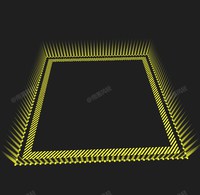
本案例演示 终末地-据点围栏 效果:用 Canvas 2D 绘制内容并实时映射为 Three.js 纹理;核心用到 ShaderMaterial、OrbitControls、Canvas。建议先打开文首在线案例查看动态画面,再对照下方源码逐步理解。
核心概念
- Scene / Camera / WebGLRenderer 构成最小渲染闭环;大场景可开
logarithmicDepthBuffer缓解 Z-fighting。 - ShaderMaterial 通过
uniforms+ 自定义 GLSL 控制逐像素/逐点效果;透明粒子常配合depthTest: false。 - OrbitControls 提供轨道旋转/缩放;开启
enableDamping后需在 animate 中controls.update()。 - CanvasTexture 每帧或按需把 2D Canvas 内容上传 GPU,适合动态文字、图表、视频帧贴图。
实现步骤
- 搭建 Scene、PerspectiveCamera、WebGLRenderer,挂载 canvas 并处理
resize - 定义 uniforms / onBeforeCompile 或 ShaderMaterial,编写 GLSL 与材质参数
- 创建 OrbitControls(及 Raycaster 等交互控件,若源码包含)
- 在
requestAnimationFrame循环中更新状态并 render(Cesium 为viewer.render或自动渲染)
代码要点
import * as THREE from "three";
import { OrbitControls } from "three/examples/jsm/controls/OrbitControls.js";
import { GUI } from "dat.gui";

/** <typedef> Fence_Constructor_Opts
 * @typedef {Object} Fence_Constructor_Opts
 * @property {THREE.Vector3Like}          range      围栏范围
 * @property {number}                     [segment]  单位长度内围栏分段数
 * @property {number}                     [width]    单个栅栏的宽度比例
 * @property {THREE.ColorRepresentation}  [color]    围栏颜色
 * @property {boolean}                    [useSimp]  是否启用远处栅栏简化
 */

/** ## 终末地据点风格围栏
 * @author ylfq
 *
 * ### tips
 * - 使用时需保证边长与分段数的比值为整数,否则边缘会出现偏差
 */
class Fence extends THREE.Group {
  /** ### 创建围栏
   * @param {Fence_Constructor_Opts} opts
   */
  constructor(opts) {
    super();

    // 复制参数并创建参数中对象的副本
    /** @type {Required<Fence_Constructor_Opts>} */
    const params = {
      range: new THREE.Vector3().copy(opts.range),
      segment: opts.segment ?? 1,
      width: opts.width ?? 0.7,
      color: new THREE.Color(opts.color ?? 0xffff00),
      useSimp: opts.useSimp ?? true,
    };
    this.params = params;

    // 通用 uniform 访问器,统一控制参数
    const commonUniforms = {
      U_range: {
        get value() {
          return params.range;
        },
      },
      U_segment: {
        get value() {
          return params.segment;
        },
      },
      U_color: {
        get value() {
          return params.color;
        },
      },
      U_width: {
        get value() {
          return params.width;
        },
      },
      U_useSimp: {
        get value() {
          return params.useSimp;
        },
      },
      U_time: {
        value: 0,
      },
    };

    // 通用材质设置
    const commonMaterialSettings = {
      side: THREE.DoubleSide,
      transparent: true,
      depthTest: false,
      depthWrite: false,
    };

    // part_0 竖向围栏,四面包围无顶无底
    // 竖向围栏为四个平面,仅需访问此平面内的分段数,所以使用一套着色器, segment 参数在 uniform 中设置
    // X轴向分段材质
    const part_0_mat_x = new THREE.ShaderMaterial({
      uniforms: {
        ...commonUniforms,
        U_segment: {
          get value() {
            return params.segment * params.range.x;
          },
        },
      },
      vertexShader: Fence.part_0_mat_vs,
      fragmentShader: Fence.part_0_mat_fs,
      ...commonMaterialSettings,
    });
    // Z轴向分段材质
    const part_0_mat_z = new THREE.ShaderMaterial({
      uniforms: {
        ...commonUniforms,
        U_segment: {
          get value() {
            return params.segment * params.range.z;
          },
        },
      },
      vertexShader: Fence.part_0_mat_vs,
      fragmentShader: Fence.part_0_mat_fs,
      ...commonMaterialSettings,
    });
    this.part_0 = new THREE.Mesh(Fence.part_0_geo, [part_0_mat_z, part_0_mat_x]);

    // part_1 底部条带
    const part_1_mat = new THREE.ShaderMaterial({
      uniforms: {
        ...commonUniforms,
      },
      vertexShader: Fence.part_1_mat_vs,
      fragmentShader: Fence.part_1_mat_fs,
      ...commonMaterialSettings,
    });
    this.part_1 = new THREE.Mesh(Fence.part_1_geo, part_1_mat);

    this.add(this.part_0, this.part_1);
  }

  /** ### 存储创建时参数
   * @type {Required<Fence_Constructor_Opts>}
   */
  params;

  /** ### part_0 竖向围栏
   * @type {THREE.Mesh<THREE.BufferGeometry, THREE.ShaderMaterial[]>}
   */
  part_0;
  /** ### part_1 底部条带
   * @type {THREE.Mesh<THREE.BufferGeometry, THREE.ShaderMaterial>}
   */
  part_1;

  /** ### 标记围栏是否已被销毁
   * @type {boolean}
   */
  disposed = false;

  /** ### 更新时间
   * @param {number} elapsed 场景时间
   */
  update(elapsed) {
    this.part_1.material.uniforms.U_time.value = elapsed;
  }

  /** ### 重设围栏参数
   * @param {Partial<Fence_Constructor_Opts>} opts
   */
  setParams(opts) {
    if (this.disposed) {
      console.warn("围栏已被销毁,设置参数无效");
      return;
    }

    for (const key in opts) {
      const oldValue = this.params[key];
      const newValue = opts[key];
      if (oldValue instanceof THREE.Vector3) {
        oldValue.copy(newValue);
      } else if (oldValue instanceof THREE.Color) {
        oldValue.set(newValue);
      } else {
        this.params[key] = newValue;
      }
    }
  }

  /** ### 销毁围栏
   */
  dispose() {
    if (this.disposed) {
      console.warn("围栏已被销毁,无需重复销毁");
      return;
    }

    this.part_0.material[0].dispose();
    this.part_0.material[1].dispose();
    this.part_0.removeFromParent();
    this.part_0 = null;

    this.part_1.material.dispose();
    this.part_1.removeFromParent();
    this.part_1 = null;

    this.disposed = true;
  }

  /** ### part_0 geometry
   * @type {THREE.BufferGeometry}
   */
  static part_0_geo;
  /** ### part_1 geometry
   * @type {THREE.BufferGeometry}
   */
  static part_1_geo;

  /** ### part_0 material vertexShader
   * @type {string}
   */
  static part_0_mat_vs;
  /** ### part_0 material fragmentShader
   * @type {string}
   */
  static part_0_mat_fs;
  /** ### part_1 material vertexShader
   * @type {string}
   */
  static part_1_mat_vs;
  /** ### part_1 material fragmentShader
   * @type {string}
   */
  static part_1_mat_fs;
}

// 由于需要频繁更新围栏范围,所以 attribute position 存储归一化坐标,在着色器中计算实际位置
Fence.part_0_geo = (() => {
  const res = new THREE.BufferGeometry();
  res.setIndex(
    [
      [0, 1, 3],
      [0, 3, 2],

      [4, 5, 7],
      [4, 7, 6],

      [8, 9, 11],
      [8, 11, 10],

      [12, 13, 15],
      [12, 15, 14],
    ].flat()
  );
  res.setAttribute(
    "position",
    new THREE.Float32BufferAttribute(
      [
        [0.5, 0, 0.5],
        [0.5, 0, -0.5],
        [0.5, 1, 0.5],
        [0.5, 1, -0.5],

        [0.5, 0, -0.5],
        [-0.5, 0, -0.5],
        [0.5, 1, -0.5],
        [-0.5, 1, -0.5],

        [-0.5, 0, -0.5],
        [-0.5, 0, 0.5],
        [-0.5, 1, -0.5],
        [-0.5, 1, 0.5],

        [-0.5, 0, 0.5],
        [0.5, 0, 0.5],
        [-0.5, 1, 0.5],
        [0.5, 1, 0.5],
      ].flat(),
      3
    )
  );
  res.setAttribute(
    "uv",
    new THREE.Float32BufferAttribute(
      [
        [0.0, 0.0],
        [1.0, 0.0],
        [0.0, 1.0],
        [1.0, 1.0],

        [0.0, 0.0],
        [1.0, 0.0],
        [0.0, 1.0],
        [1.0, 1.0],

        [0.0, 0.0],
        [1.0, 0.0],
        [0.0, 1.0],
        [1.0, 1.0],

        [0.0, 0.0],
        [1.0, 0.0],
        [0.0, 1.0],
        [1.0, 1.0],
      ].flat(),
      2
    )
  );
  res.setAttribute(
    "normal",
    new THREE.Float32BufferAttribute(
      [
        [1, 0, 0],
        [1, 0, 0],
        [1, 0, 0],
        [1, 0, 0],

        [0, 0, -1],
        [0, 0, -1],
        [0, 0, -1],
        [0, 0, -1],

        [-1, 0, 0],
        [-1, 0, 0],
        [-1, 0, 0],
        [-1, 0, 0],

        [0, 0, 1],
        [0, 0, 1],
        [0, 0, 1],
        [0, 0, 1],
      ].flat(),
      3
    )
  );

  res.addGroup(0, 6, 0);
  res.addGroup(6, 6, 1);
  res.addGroup(12, 6, 0);
  res.addGroup(18, 6, 1);

  return res;
})();
Fence.part_1_geo = (() => {
  const res = new THREE.BufferGeometry();
  res.setIndex([0, 1, 2, 0, 2, 3]);
  res.setAttribute(
    "position",
    new THREE.Float32BufferAttribute(
      [
        [0.5, 0, 0.5],
        [-0.5, 0, 0.5],
        [-0.5, 0, -0.5],
        [0.5, 0, -0.5],
      ].flat(),
      3
    )
  );
  res.setAttribute(
    "uv",
    new THREE.Float32BufferAttribute(
      [
        [1, 1],
        [1, 0],
        [0, 0],
        [0, 1],
      ].flat(),
      2
    )
  );
  res.setAttribute(
    "normal",
    new THREE.Float32BufferAttribute(
      [
        [0, 1, 0],
        [0, 1, 0],
        [0, 1, 0],
        [0, 1, 0],
      ].flat(),
      3
    )
  );

  return res;
})();

// 材质仅 uniform 有区别,所以分离着色器定义
Fence.part_0_mat_vs = /* glsl */ `
  uniform  vec3  U_range   ;

  varying  vec3  V_mvpos   ;
  varying  vec2  V_uv      ;
  varying  vec3  V_normal  ;

  void main() {
    vec3 pos = position * U_range;
    vec4 mvPos = modelViewMatrix * vec4(pos, 1.0);
    vec3 norm = normalMatrix * normal;

    V_mvpos   =  mvPos.xyz  ;
    V_uv      =  uv         ;
    V_normal  =  norm       ;

    gl_Position = projectionMatrix * mvPos;
  }
`;
Fence.part_0_mat_fs = /* glsl */ `
  uniform  vec3   U_color    ;
  uniform  float  U_segment  ;
  uniform  float  U_width    ;
  uniform  bool   U_useSimp  ;

  varying  vec3   V_mvpos    ;
  varying  vec2   V_uv       ;
  varying  vec3   V_normal   ;

  vec4 getColor_fence() {
    // 在较远处或法线与视角夹角较大的地方使用纯色带避免摩尔纹
    float s = 400.0 / length(V_mvpos) * abs(dot(normalize(V_normal), normalize(-V_mvpos)));
    float v = U_useSimp ? smoothstep(0.0, 1.0, (s - 0.9) * 0.7) : 1.0;

    // Y轴上从下往上衰减
    float vy = 1.0 - pow(V_uv.y, 1.5);

    vec4 c_0 = vec4(U_color, pow(U_width, 2.0) * vy * 0.8);

    if (v == 0.0) return c_0;

    // 按照分段划分区块,计算区块内坐标
    float f = fract(V_uv.x * U_segment);
    // X轴上以 0.5 为中心,向左右两侧衰减,且宽度从下往上衰减,边界值为 0.5 +- 0.5 * U_width * vy
    float vx = max(1.0 - pow(abs((0.5 - f) / (U_width * vy)) * 2.0, 1.5), 0.0);

    vec4 c_1 = vec4(U_color, vx * vy * 0.8);

    return mix(c_0, c_1, v);
  }

  void main() {
    vec4 c_out = getColor_fence();

    if (c_out.a == 0.0) discard;

    gl_FragColor = c_out;
  }
`;
Fence.part_1_mat_vs = /* glsl */ `
  uniform  vec3   U_range    ;
  uniform  float  U_segment  ;

  varying  vec3   V_pos      ;
  varying  vec3   V_wpos     ;
  varying  vec3   V_mvpos    ;
  varying  vec2   V_uv       ;
  varying  vec3   V_normal   ;

  void main() {
    // 底面需要比围栏实际范围稍大一点
    vec3 pos = position * (U_range + 1.0 / U_segment);
    vec4 wPos = modelMatrix * vec4(pos, 1.0);
    vec4 mvPos = modelViewMatrix * vec4(pos, 1.0);
    vec3 norm = normalMatrix * normal;

    V_pos     =  pos        ;
    V_wpos    =  wPos.xyz   ;
    V_mvpos   =  mvPos.xyz  ;
    V_uv      =  uv         ;
    V_normal  =  norm       ;

    gl_Position = projectionMatrix * mvPos;
  }
`;
Fence.part_1_mat_fs = /* glsl */ `
  uniform  vec3   U_range    ;
  uniform  vec3   U_color    ;
  uniform  float  U_segment  ;
  uniform  float  U_width    ;
  uniform  bool   U_useSimp  ;
  uniform  float  U_time     ;

  varying  vec3   V_pos      ;
  varying  vec3   V_wpos     ;
  varying  vec3   V_mvpos    ;
  varying  vec2   V_uv       ;
  varying  vec3   V_normal   ;

  // 获取底部圆点颜色
  vec4 getColor_dot() {
    // 按照分段划分区块,计算区块内坐标
    // 由于底部实际比围栏大了一个分段,所以这里的实际分段数需要 + 1
    vec2 uv = fract(V_uv * (U_range.zx * U_segment + 1.0));
    // 计算此处的颜色强度值
    float v = max(1.0 - pow(length((uv - 0.5) * 2.0) / U_width * 1.5, 4.5), 0.0);
    return vec4(U_color, v);
  }

  // 获取底部条纹带颜色
  vec4 getColor_stripe() {
    // 在较远处或法线与视角夹角较大的地方使用纯色带避免摩尔纹
    float s = 300.0 / length(V_mvpos) * abs(dot(normalize(V_normal), normalize(-V_mvpos)));
    float v = U_useSimp ? smoothstep(0.0, 1.0, (s - 0.9) * 0.7) : 1.0;

    // 纯色色带
    vec4 c_0 = vec4(U_color, 0.8);

    if (v == 0.0) return c_0;

    // 斜 45 度条纹带,应用时间轴偏移动画
    vec4 c_1 = vec4(U_color, fract(V_wpos.x - V_wpos.z + U_time * 2.0) < 0.5 ? 1.0 : 0.0);

    return mix(c_0, c_1, v);
  }


  void main() {
    vec4 c_out = vec4(0.0);

    float unitSize = 1.0 / U_segment;

    // 计算当前片元到围栏边缘的距离
    vec2 d_xz = U_range.xz * 0.5 - abs(V_pos.xz);
    float d = min(d_xz.x, d_xz.y);

    if (d < unitSize * 0.5) {
      c_out = getColor_dot();
    } else if (d > unitSize * 1.0 && d < unitSize * 2.5) {
      c_out = getColor_stripe();
    }

    if (c_out.a == 0.0) discard;

    gl_FragColor = c_out;
  }
`;

const canvas = document.createElement("canvas");
canvas.style.width = "100vw !important";
canvas.style.height = "100vh !important";
document.body.appendChild(canvas);

const renderer = new THREE.WebGLRenderer({ canvas: canvas, antialias: true, alpha: true });
renderer.setClearColor(0x333333, 0);

const scene = new THREE.Scene();

const fence = new Fence({
  range: { x: 100, y: 10, z: 100 },
  segment: 0.7,
  width: 0.75,
  color: 0xffff00,
});
scene.add(fence);

const camera = new THREE.PerspectiveCamera(90, 1, 0.1, 1000);
camera.position.set(40, 50, 100);

const controls = new OrbitControls(camera, canvas);
controls.enableDamping = true;

const timer = new THREE.Timer();

const tick = (delta, elapsed) => {
  controls.update(delta);

  fence.update(elapsed);
};

const render = () => {
  renderer.render(scene, camera);
};

const ani = () => {
  const elapsed = timer.getElapsed();
  const delta = timer.getDelta();

  timer.update();

  tick(delta, elapsed);
  render();

  requestAnimationFrame(ani);
};

const data = {
  _range: { x: 100, y: 10, z: 100 },
  get x() {
    return this._range.x;
  },
  set x(v) {
    this._range.x = v;
    fence.setParams({ range: this._range });
  },
  get y() {
    return this._range.y;
  },
  set y(v) {
    this._range.y = v;
    fence.setParams({ range: this._range });
  },
  get z() {
    return this._range.z;
  },
  set z(v) {
    this._range.z = v;
    fence.setParams({ range: this._range });
  },

  get segment() {
    return fence.params.segment;
  },
  set segment(v) {
    fence.setParams({ segment: v });
  },

  get width() {
    return fence.params.width;
  },
  set width(v) {
    fence.setParams({ width: v });
  },

  get color() {
    return `#${fence.params.color.getHexString()}`;
  },
  set color(v) {
    fence.setParams({ color: v });
  },

  get useSimp() {
    return fence.params.useSimp;
  },
  set useSimp(v) {
    fence.setParams({ useSimp: v });
  },
};
const gui = new GUI();
gui.add(data, "x", 50, 200, 0.001);
gui.add(data, "y", 5, 20, 0.001);
gui.add(data, "z", 50, 200, 0.001);
gui.add(data, "segment", 0.1, 2.0, 0.001).name("围栏密度");
gui.add(data, "width", 0.1, 1.0, 0.001).name("围栏宽度");
gui.addColor(data, "color").name("围栏颜色");
gui.add(data, "useSimp").name("启用简化");

new ResizeObserver(() => {
  const rect = document.body.getBoundingClientRect();
  const w = rect.width;
  const h = rect.height;
  const a = w / h;
  const dpr = window.devicePixelRatio * 1.25;

  renderer.setSize(w, h, false);
  renderer.setPixelRatio(dpr);

  camera.aspect = a;
  camera.updateProjectionMatrix();
}).observe(document.body);

ani();
完整源码:GitHub
小结
- 本文提供 终末地-据点围栏 完整 Three.js 源码与在线 Demo,建议先运行案例再改 uniform/参数做二次实验
- 更多 Three.js 实战案例见 three-cesium-examples 合集 与 GitHub 开源仓库