精灵标签 · Sprite Label · ▶ 在线运行案例
案例合集: 三维可视化功能案例(threehub.cn)
开源仓库github地址: https://github.com/z2586300277/three-cesium-examples
**400个案例代码: ** 网盘链接
你将学到什么
- Canvas 2D 动态画标签(图 + 字)
- CanvasTexture 转 Three.js 纹理
sprite.center锚点、devicePixelRatio高清
效果说明
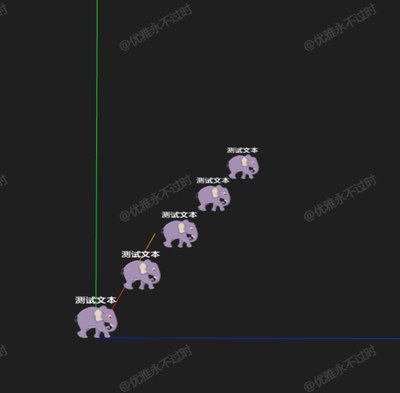
5 个 Sprite 沿对角线排列,每个显示 头像 +「测试文本」,纹理来自运行时 canvas 绘制。
核心概念
const canvas = document.createElement('canvas');
const ctx = canvas.getContext('2d');
// 高 DPI
canvas.width = logicalWidth * devicePixelRatio;
ctx.scale(devicePixelRatio, devicePixelRatio);
ctx.drawImage(img, ...);
ctx.fillText(text, ...);

const texture = new THREE.CanvasTexture(canvas);
texture.colorSpace = THREE.SRGBColorSpace;

const sprite = new THREE.Sprite(new THREE.SpriteMaterial({ map: texture }));
sprite.center.set(0.5, 0);  // 底边中心锚点,适合「桩子上的牌」
改 canvas 内容后需 texture.needsUpdate = true。
代码要点
import * as THREE from 'three'
import { OrbitControls } from 'three/examples/jsm/controls/OrbitControls.js'

const box = document.getElementById('box')

const scene = new THREE.Scene()

const camera = new THREE.PerspectiveCamera(50, box.clientWidth / box.clientHeight, 0.1, 1000)

camera.position.set(2, 10, 10)

const renderer = new THREE.WebGLRenderer({ antialias: true, alpha: true, logarithmicDepthBuffer: true })

renderer.setSize(box.clientWidth, box.clientHeight)

box.appendChild(renderer.domElement)

const controls = new OrbitControls(camera, renderer.domElement)

controls.enableDamping = true

scene.add(new THREE.AxesHelper(100))

animate()

function animate() {

    requestAnimationFrame(animate)

    controls.update()

    renderer.render(scene, camera)

}

window.onresize = () => {

    renderer.setSize(box.clientWidth, box.clientHeight)

    camera.aspect = box.clientWidth / box.clientHeight

    camera.updateProjectionMatrix()

}

const canvas = document.createElement('canvas');
const ctx = canvas.getContext('2d');

const devicePixelRatio = window.devicePixelRatio * 4;
const logicalWidth = 124;
const logicalHeight = 164;

canvas.width = logicalWidth * devicePixelRatio;
canvas.height = logicalHeight * devicePixelRatio;
canvas.style.width = `${logicalWidth}px`;
canvas.style.height = `${logicalHeight}px`;

ctx.scale(devicePixelRatio, devicePixelRatio);

const img = new Image();
img.src = HOST + 'files/author/z2586300277.png';

const text = '测试文本';

const setText = () => {

    // 画图
    const imglong = 124;
    const left = (logicalWidth - imglong) / 2;
    ctx.drawImage(img, left, 40, imglong, imglong); // 向下移动图片

    // 写字
    ctx.fillStyle = '#fff';
    ctx.font = 'Bold 30px Arial';

    const textWidth = ctx.measureText(text).width;
    ctx.fillText(text, (logicalWidth - textWidth) / 2, 30); // 放在图片上方

    // 纹理图
    const texture = new THREE.CanvasTexture(canvas);
    texture.colorSpace = THREE.SRGBColorSpace;
    texture.needsUpdate = true;

    // 纹理生成材质
    const material = new THREE.SpriteMaterial({ map: texture });

    // 创建精灵几何体
    const sprite = new THREE.Sprite(material);
    sprite.center = new THREE.Vector2(0.5, 0);

    return sprite;

}

img.onload = () => {

    for (let i = 0; i < 5; i++) {

        const sprite = setText()

        sprite.position.set(i, i, i)

        scene.add(sprite)

    }

}
完整源码:GitHub
小结
- 本文提供 精灵标签 完整 Three.js 源码与在线 Demo,建议先运行案例再改 uniform/参数做二次实验
- 更多 Three.js 实战案例见 three-cesium-examples 合集 与 GitHub 开源仓库