场景雾化 · Scene Fog · ▶ 在线运行案例
案例合集: 三维可视化功能案例(threehub.cn)
开源仓库github地址: https://github.com/z2586300277/three-cesium-examples
**400个案例代码: ** 网盘链接
你将学到什么
- Fog(线性雾) 与 FogExp2(指数雾) 的区别
scene.fog与renderer.setClearColor颜色一致的重要性- 远距离物体如何被雾 自然隐没
效果说明
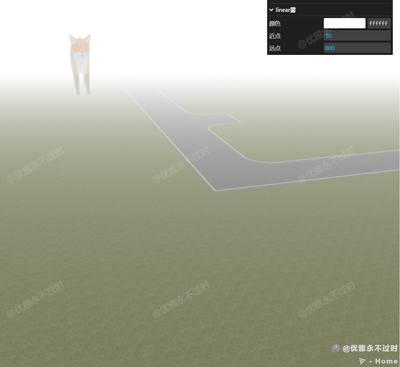
场景中有一只 Fox 模型(z = -500,很远)和一块 放大的地面(较近)。开启雾后,远处狐狸逐渐 融入雾色 看不见,近处地面清晰。GUI 可切换:
- 雾类型:linear / exp2
- 启用/关闭雾
- 雾颜色、near/far(线性)或 density(指数)
核心概念
雾如何工作?
雾在 片元着色阶段 根据像素到相机的距离,将物体颜色 向雾色混合:
最终颜色 = mix(物体颜色, 雾色, fogFactor)
| 类型 | 构造函数 | fogFactor 依据 |
|---|---|---|
| Fog 线性雾 | new THREE.Fog(color, near, far) |
near 内无雾,far 外全雾,之间线性 |
| FogExp2 指数雾 | new THREE.FogExp2(color, density) |
距离越远指数增长,更自然 |
// 线性雾:10~800 单位之间渐变
scene.fog = new THREE.Fog(0xffffff, 10, 800);

// 指数雾:density 越大雾越浓
scene.fog = new THREE.FogExp2(0xffffff, 0.005);
背景色必须匹配
renderer.setClearColor(fogColor);
scene.fog = new THREE.Fog(fogColor, near, far);
若 setClearColor 与 fog.color 不一致,地平线会出现 明显色差接缝。
本案例场景布局
// 狐狸在很远的 -Z
gltf.scene.position.set(0, 0, -500);

// 地面放大 10 倍,偏移到相机前方
model.scale.set(10, 10, 10);
model.position.z += 60;
model.position.x -= 200;
far = 800 时,狐狸距相机约 500+,已在雾区边缘,适合演示「远物消失」。
logarithmicDepthBuffer
本案例 Renderer 开了 logarithmicDepthBuffer: true,大 near/far 跨度(0.1 ~ 100000)时减轻 Z-fighting,与雾效配合展示大场景。
实现步骤
- Scene + 相机远裁剪
far: 100000+ 灯光 - 加载远距 Fox + 近距地面 glb
getFog(type, color)工厂函数创建两种雾- GUI 切换 type / enable,动态
setFogFolder重建参数面板 - 改雾色时同步
renderer.setClearColor
代码要点
import * as THREE from 'three'
import { OrbitControls } from 'three/examples/jsm/controls/OrbitControls.js'
import { GLTFLoader } from 'three/examples/jsm/loaders/GLTFLoader.js'
import { GUI } from 'three/addons/libs/lil-gui.module.min.js'

const box = document.getElementById('box')

const scene = new THREE.Scene()

const camera = new THREE.PerspectiveCamera(50, box.clientWidth / box.clientHeight, 0.1, 100000)

camera.position.set(0, 20, 60)

const renderer = new THREE.WebGLRenderer({ antialias: true, alpha: true, logarithmicDepthBuffer: true })

renderer.setSize(box.clientWidth, box.clientHeight)

box.appendChild(renderer.domElement)

const controls = new OrbitControls(camera, renderer.domElement)

controls.enableDamping = true

animate()

function animate() {

    requestAnimationFrame(animate)

    controls.update()

    renderer.render(scene, camera)

}

scene.add(new THREE.AmbientLight(0xffffff, 1))

const directionalLight = new THREE.DirectionalLight(0xffffff, 1)

directionalLight.position.set(0, 100, 0)

scene.add(directionalLight)

window.onresize = () => {

    renderer.setSize(box.clientWidth, box.clientHeight)

    camera.aspect = box.clientWidth / box.clientHeight

    camera.updateProjectionMatrix()

}

new GLTFLoader().load(GLOBAL_CONFIG.getFileUrl('files/model/Fox.glb'), (gltf) => {

    gltf.scene.position.set(0, 0, -500)

    scene.add(gltf.scene)

})

new GLTFLoader().load(GLOBAL_CONFIG.getFileUrl('models/glb/foorGround.glb'), (gltf) => {

    const model = gltf.scene

    model.position.z += 60

    model.position.x -= 200

    model.scale.set(10, 10, 10)

    scene.add(model)

})

function getFog(type, color) {

    renderer.setClearColor(color || 0xffffff)

    if (type === 'linear') return new THREE.Fog(color || 0xffffff, 10, 800)

    else return new THREE.FogExp2(color || 0xffffff, 0.005)

}

const folder = new GUI()

let fogFolder = null

const fogOption = { type: scene.fog instanceof THREE.FogExp2 ? 'exp2' : 'linear', enable: !!scene.fog }

folder.add(fogOption, 'type', ['linear', 'exp2']).name('雾类型').onChange((v) => {

    scene.fog = getFog(v, scene.fog?.color)

    setFogFolder(v)

})

folder.add(fogOption, 'enable').name('启用雾').onChange((v) => {

    if (v) scene.fog = getFog(fogOption.type)

    else scene.fog = null

    setFogFolder(fogOption.type)

})

fogOption.enable && setFogFolder(fogOption.type)

function setFogFolder(type) {

    if (fogFolder) {

        fogFolder.destroy?.()

        fogFolder = null

    }

    if (!scene.fog) return

    fogFolder = folder.addFolder(type + '雾')

    fogFolder.addColor(scene.fog, 'color').name('颜色').onChange((v) => renderer.setClearColor(v))

    if (type === 'linear') {

        fogFolder.add(scene.fog, 'near').name('近点')

        fogFolder.add(scene.fog, 'far').name('远点')

    }

    else fogFolder.add(scene.fog, 'density').name('密度').min(0).max(0.1).step(0.00001)

}
完整源码:GitHub
小结
- 本文提供 场景雾化 完整 Three.js 源码与在线 Demo,建议先运行案例再改 uniform/参数做二次实验
- 更多 Three.js 实战案例见 three-cesium-examples 合集 与 GitHub 开源仓库