轮廓光 · Outline Pass · ▶ 在线运行案例
案例合集: 三维可视化功能案例(threehub.cn)
开源仓库github地址: https://github.com/z2586300277/three-cesium-examples
**400个案例代码: ** 网盘链接
你将学到什么
- OutlinePass 给选中物体加发光轮廓
- EffectComposer Pass 链:RenderPass → OutlinePass → OutputPass
- 点击 Raycaster 更新
outlinePass.selectedObjects
效果说明
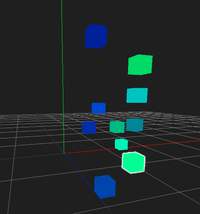
10 个随机彩色立方体,点击某个 cube 后出现 描边高亮;点击空白处取消。常用于编辑器选中、策略游戏单位选中。
核心概念
后期管线
const composer = new EffectComposer(renderer);
composer.addPass(new RenderPass(scene, camera));
composer.addPass(outlinePass);
composer.addPass(new OutputPass());  // 色彩空间校正

// 循环里用 composer.render() 替代 renderer.render()
OutlinePass
const outlinePass = new OutlinePass(
    new THREE.Vector2(width, height),
    scene,
    camera
);
outlinePass.selectedObjects = [mesh];  // 要高亮的物体数组
可配置 edgeStrength、edgeGlow、visibleEdgeColor 等(本案例用默认)。
点击拾取
const mouse = new THREE.Vector2(
    (offsetX / width) * 2 - 1,
    -(offsetY / height) * 2 + 1
);
raycaster.setFromCamera(mouse, camera);
const hits = raycaster.intersectObjects(scene.children);
outlinePass.selectedObjects = hits.length ? [hits[0].object] : [];
::: tip
intersectObjects 默认不递归;若模型是 Group,需传 true 递归子 Mesh。
:::
代码要点
import * as THREE from 'three'
import { OrbitControls } from 'three/examples/jsm/controls/OrbitControls.js'

import { EffectComposer } from 'three/examples/jsm/postprocessing/EffectComposer.js';
import { RenderPass } from 'three/examples/jsm/postprocessing/RenderPass.js';
import { OutlinePass } from 'three/examples/jsm/postprocessing/OutlinePass.js'
import { OutputPass } from 'three/examples/jsm/postprocessing/OutputPass.js'

const box = document.getElementById('box')

const scene = new THREE.Scene()

const camera = new THREE.PerspectiveCamera(75, box.clientWidth / box.clientHeight, 0.1, 1000)

camera.position.set(15, 15, 15)

const renderer = new THREE.WebGLRenderer({ antialias: true, alpha: true, logarithmicDepthBuffer: true })

renderer.setSize(box.clientWidth, box.clientHeight)

box.appendChild(renderer.domElement)

const controls = new OrbitControls(camera, renderer.domElement)

controls.enableDamping = true

controls.dampingFactor = 0.02

// 后期处理
const composer = new EffectComposer(renderer);

const renderPass = new RenderPass(scene, camera);

composer.addPass(renderPass);

// 轮廓
const outlinePass = new OutlinePass(new THREE.Vector2(box.clientWidth, box.clientHeight), scene, camera);

composer.addPass(outlinePass);

// 色彩校正
const outputPass = new OutputPass();

composer.addPass(outputPass);

// 渲染
animate()

function animate() {

    requestAnimationFrame(animate)

    controls.update()

    composer.render()

}

// 适配
window.onresize = () => {

    renderer.setSize(box.clientWidth, box.clientHeight)

    camera.aspect = box.clientWidth / box.clientHeight

    camera.updateProjectionMatrix()

}

// 点击事件

const raycaster = new THREE.Raycaster()

box.addEventListener('click', (event) => {

    const mouse = new THREE.Vector2(

        (event.offsetX / event.target.clientWidth) * 2 - 1,

        -(event.offsetY / event.target.clientHeight) * 2 + 1

    )

    raycaster.setFromCamera(mouse, camera)

    const intersects = raycaster.intersectObjects(scene.children)

    if (intersects.length > 0) outlinePass.selectedObjects = [intersects[0].object]

    else outlinePass.selectedObjects = []

})

// 辅助
scene.add(new THREE.AxesHelper(500), new THREE.GridHelper(100, 20))

// 物体
for (let i = 0; i < 10; i++) {

    const geometry = new THREE.BoxGeometry()

    const material = new THREE.MeshBasicMaterial({ color: 0x00ff00 * Math.random() })

    const cube = new THREE.Mesh(geometry, material)

    cube.position.x = Math.random() * 10

    cube.position.y = Math.random() * 10

    cube.position.z = Math.random() * 10

    scene.add(cube)

}
完整源码:GitHub
小结
- 本文提供 轮廓光 完整 Three.js 源码与在线 Demo,建议先运行案例再改 uniform/参数做二次实验
- 更多 Three.js 实战案例见 three-cesium-examples 合集 与 GitHub 开源仓库