渐变三角形 · Gradient Triangle · ▶ 在线运行案例
案例合集: 三维可视化功能案例(threehub.cn)
开源仓库github地址: https://github.com/z2586300277/three-cesium-examples
**400个案例代码: ** 网盘链接
你将学到什么
- 单三角形 三色顶点 在面内自动插值
setAttribute('color')+vertexColors: truesetIndex用 3 顶点 + 索引绘制
效果说明
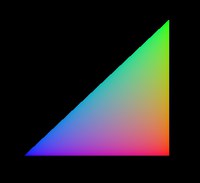
一个三角形,三个顶点分别为 红、绿、蓝,面内呈现平滑 RGB 渐变(GPU 重心插值)。
核心概念
与 顶点颜色入门 相同原理,本案例简化为 1 三角面 + index:
geometry.setAttribute('position', new THREE.BufferAttribute(vertices, 3));
geometry.setAttribute('color', colorAttribute);
geometry.setIndex([0, 1, 2]);

new THREE.MeshBasicMaterial({ vertexColors: true, side: THREE.DoubleSide });
| 顶点 | 位置 | 颜色 |
|---|---|---|
| 0 | (0,0,0) | 红 |
| 1 | (0,200,0) | 绿 |
| 2 | (200,0,0) | 蓝 |
代码要点
import * as THREE from 'three'
import { OrbitControls } from 'three/examples/jsm/controls/OrbitControls.js'

const box = document.getElementById('box')

const scene = new THREE.Scene()

const camera = new THREE.PerspectiveCamera(75, box.clientWidth / box.clientHeight, 0.1, 1000)

camera.position.set(0, 0, 500)

const renderer = new THREE.WebGLRenderer()

renderer.setSize(box.clientWidth, box.clientHeight)

new OrbitControls(camera, renderer.domElement)

window.onresize = () => {

  renderer.setSize(box.clientWidth, box.clientHeight)

  camera.aspect = box.clientWidth / box.clientHeight

  camera.updateProjectionMatrix()

}

box.appendChild(renderer.domElement)

initObject();
function initObject() {
  let geometry = new THREE.BufferGeometry(); // 使用BufferGeometry

  let vertices = new Float32Array([
    0, 0, 0, // 顶点p1
    0, 200, 0, // 顶点p2
    200, 0, 0 // 顶点p3
  ]);

  geometry.setAttribute('position', new THREE.BufferAttribute(vertices, 3));

  let colors = [
    1.0, 0.0, 0.0, // 颜色1 (红色)
    0.0, 1.0, 0.0, // 颜色2 (绿色)
    0.0, 0.0, 1.0  // 颜色3 (蓝色)
  ];

  // 创建顶点颜色属性
  let colorAttribute = new THREE.BufferAttribute(new Float32Array(colors), 3);
  geometry.setAttribute('color', colorAttribute);

  // 定义索引,创建三角形面
  let indices = [
    0, 1, 2 // 索引0, 1, 2 表示顶点数组中的p1, p2, p3
  ];
  let indexAttribute = new THREE.BufferAttribute(new Uint16Array(indices), 1);
  geometry.setIndex(indexAttribute);

  let material = new THREE.MeshBasicMaterial({
    vertexColors: true,
    side: THREE.DoubleSide,
    wireframe: false
  });

  let obj = new THREE.Mesh(geometry, material);
  scene.add(obj);
}
function animate() {

  requestAnimationFrame(animate)
  renderer.render(scene, camera)

}

animate()
完整源码:GitHub
小结
- 本文提供 渐变三角形 完整 Three.js 源码与在线 Demo,建议先运行案例再改 uniform/参数做二次实验
- 更多 Three.js 实战案例见 three-cesium-examples 合集 与 GitHub 开源仓库