简单3d拓扑图 · 3D Topology · ▶ 在线运行案例
案例合集: 三维可视化功能案例(threehub.cn)
开源仓库github地址: https://github.com/z2586300277/three-cesium-examples
**400个案例代码: ** 网盘链接
你将学到什么
- OrbitControls 相机轨道交互
- CatmullRomCurve3 样条曲线路径
requestAnimationFrame渲染循环与resize自适应
效果说明
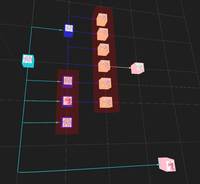
本案例演示 简单3d拓扑图 效果:基于 WebGL 实现「简单3d拓扑图」可视化效果,附完整可运行源码;核心用到 OrbitControls、CatmullRomCurve3。建议先打开文首在线案例查看动态画面,再对照下方源码逐步理解。
核心概念
- OrbitControls 轨道旋转缩放;开
enableDamping时每帧需controls.update()。
实现步骤
- 搭建 Scene / Camera / Renderer 与 OrbitControls
- rAF 循环中 update 并 render
代码要点
import * as THREE from "three"
import { OrbitControls } from 'three/examples/jsm/controls/OrbitControls.js'

const box = document.getElementById('box')

const scene = new THREE.Scene()
const camera = new THREE.PerspectiveCamera(75, box.clientWidth / box.clientHeight, 0.1, 1000)
camera.position.set(0, 40, 40)

const renderer = new THREE.WebGLRenderer({ antialias: true, alpha: true, preserveDrawingBuffer: true, logarithmicDepthBuffer: true })
renderer.setSize(box.clientWidth, box.clientHeight)
renderer.setPixelRatio(window.devicePixelRatio * 2) // 像素比
box.appendChild(renderer.domElement)

const controls = new OrbitControls(camera, renderer.domElement)
controls.enableDamping = true
controls.dampingFactor = 0.05

window.onresize = () => {
    renderer.setSize(box.clientWidth, box.clientHeight)
    camera.aspect = box.clientWidth / box.clientHeight
    camera.updateProjectionMatrix()
}

animate()
function animate() {
    requestAnimationFrame(animate)
    controls.update()
    renderer.render(scene, camera)
}

scene.add(new THREE.AxesHelper(200))

const arr = [
    { id: 1, name: '电脑', color: 0x38c9d8, level: 1, coord: [0, 0], line: [2, 3, 4, 5, 13], icon: HOST + '/files/author/z2586300277.png' },
    { id: 2, name: '主机', level: 1, color: 0x3021c1, coord: [2, 1], line: [6, 7, 8, 9, 10, 11], icon: HOST + '/files/author/z2586300277.png' },
    { id: 3, name: '显示器', level: 1, color: 0x3021c1, coord: [2, 2], line: [9], icon: HOST + '/files/author/KallkaGo.jpg' },
    { id: 4, name: '键盘', level: 1, color: 0x3021c1, coord: [2, -2], line: [6], icon: HOST + '/files/author/z2586300277.png' },
    { id: 5, name: '鼠标', level: 1, color: 0x3021c1, coord: [2, 3], line: [], icon: HOST + '/files/author/z2586300277.png' },
    { id: 6, name: '主板', level: 1, color: 0xffe0a1, coord: [4, -1], line: [], icon: HOST + '/files/author/flowers-10.jpg' },
    { id: 7, name: '硬盘', level: 1, color: 0xffe0a1, coord: [4, -2], line: [], icon: HOST + '/files/author/flowers-10.jpg' },
    { id: 8, name: '显卡', level: 1, color: 0xffe0a1, coord: [4, -3], line: [], icon: HOST + '/files/author/flowers-10.jpg' },
    { id: 9, name: '屏幕', level: 1, color: 0xffe0a1, coord: [4, 2], line: [], icon: HOST + '/files/author/flowers-10.jpg' },
    { id: 10, name: 'CPU', level: 1, color: 0xffe0a1, coord: [4, 1], line: [], icon: HOST + '/files/author/flowers-10.jpg' },
    { id: 11, name: '内存条', level: 1, color: 0xffe0a1, coord: [4, 0], line: [12], icon: HOST + '/files/author/flowers-10.jpg' },
    { id: 12, name: '测试', level: 1, color: 'pink', coord: [6, 0], line: [], icon: HOST + '/files/author/flowers-10.jpg' },
    { id: 13, name: '测试', level: 2, color: 'pink', coord: [7, 5], line: [], icon: HOST + '/files/author/KallkaGo.jpg' },
]

const arr2 = [
    [2, 3, 5],
    [6, 7, 8, 9, 10, 11]
]

const options = { xzScale: 10, meshScale: 5, flowDirection: 'right', fontSize: 1.5, textHeight: 0 }
const { xzScale, meshScale } = options

// 创建组
const group = new THREE.Group()
group.position.set(0, 10, 0)
group.rotation.x += Math.PI / 2
scene.add(group);

// 网格辅助
const grid = new THREE.GridHelper(20 * xzScale, xzScale, '#fff', 0xffffff)
group.add(grid)
grid.material.opacity = 0.5
grid.material.transparent = true

// 遍历节点
const boxArr = arr.map((i, k) => {
    const box = createBoxNode(meshScale, xzScale, i)
    group.add(box)
    return box
})

// 创建连接线
boxArr.forEach((i, k) => {
    const { line } = i.info
    line.map((id, z) => {
        const mesh = boxArr.find(j => j.info.id === id)
        if (mesh) try {
            const flowLine = createFlowLine(i.position, mesh.position, { ...options, radius: 0.1, color: i.info.color })
            group.add(flowLine)
        } catch (e) { }
    })
})

// 创建容器
arr2.forEach((i, k) => {
    const positions = i.map(j => boxArr.find(z => z.info.id === j).position)
    const mesh = createContainerNode(positions, meshScale)
    group.add(mesh)
})

/* 创建容器 */
function createContainerNode(positions, meshScale) {
    const max = ['x', 'y', 'z'].map(i => Math.max(...positions.map(j => j[i])))
    const min = ['x', 'y', 'z'].map(i => Math.min(...positions.map(j => j[i])))
    const [width, height, depth] = max.map((i, k) => Math.abs(i - min[k])).map(i => i + meshScale * 2)
    const geometry = new THREE.BoxGeometry(width, height, depth)
    const material = new THREE.MeshBasicMaterial({ color: 'red', transparent: true, opacity: 0.2 })
    const mesh = new THREE.Mesh(geometry, material)
    mesh.renderOrder = 1
    mesh.position.set((max[0] + min[0]) / 2, (max[1] + min[1]) / 2, (max[2] + min[2]) / 2)
    return mesh
}

/* 创建立方体节点 */
function createBoxNode(meshScale, xzScale, i) {
    const { coord } = i
    const box = new THREE.Mesh(
        new THREE.BoxGeometry(meshScale, meshScale, meshScale),
        new THREE.MeshBasicMaterial({ color: i.color || '' })
    )
    box.position.set(coord[0] * xzScale, 0, coord[1] * xzScale)
    box.info = i
    if (i.icon) {
        const plane = new THREE.Mesh(
            new THREE.PlaneGeometry(meshScale * 0.8, meshScale * 0.8),
            new THREE.MeshBasicMaterial({ map: new THREE.TextureLoader().load(i.icon) })
        )
        plane.position.set(0, 0, meshScale / 2 * 1.01)
        const plane2 = plane.clone()
        plane2.position.set(0, 0, -meshScale / 2 * 1.01)
        box.add(plane, plane2)
    }

    box.rotation.x += -Math.PI / 2
    return box
}

/* 创建流程线 */
function createFlowLine(p1, p2, options = {}) {
    const { meshScale, flowDirection } = options
    let p3
    if (flowDirection === 'right') p3 = new THREE.Vector3(p1.x, 0, p2.z)
    else p3 = new THREE.Vector3(p2.x, 0, p1.z)
    const distance = p3.distanceTo(p2)
    const p4 = p3.clone().lerp(p2, (distance - meshScale * 0.8) / distance)

    // 创建曲线
    const curve = new THREE.CatmullRomCurve3([p1, p3, p3.clone().multiplyScalar(1.001), p4])
    const { radius, segments, color, radialSegments } = options
    const geometry = new THREE.TubeGeometry(curve, segments || 100, radius || 0.5, radialSegments || 8, false)
    const material = new THREE.MeshBasicMaterial({ color: color || 0x00ff00 })
    const mesh = new THREE.Mesh(geometry, material)

    // 创建一个圆锥箭头
    const g = new THREE.ConeGeometry(radius ? radius * 4 : 2, meshScale * 0.4, radialSegments || 8)
    const m = new THREE.MeshBasicMaterial({ color: color || 0x00ff00 })
    const arrow = new THREE.Mesh(g, m)
    arrow.position.copy(p4)
    const { quaternion } = getDirectionQuaternion(p4, p2)
    arrow.quaternion.copy(quaternion)

    // 创建一个组
    const group = new THREE.Group()
    group.add(arrow)
    group.add(mesh)

    return group
}

function getDirectionQuaternion(start, end) {
    const direction = new THREE.Vector3()
    direction.subVectors(end, start).normalize()
    const quaternion = new THREE.Quaternion()
    quaternion.setFromUnitVectors(new THREE.Vector3(0, 1, 0), direction)
    const euler = new THREE.Euler()
    euler.setFromQuaternion(quaternion)
    return { quaternion, euler }

}
完整源码:GitHub
小结
- 本文提供 简单3d拓扑图 完整 Three.js 源码与在线 Demo,建议先运行案例再改 uniform/参数做二次实验
- 更多 Three.js 实战案例见 three-cesium-examples 合集 与 GitHub 开源仓库