表情 · Face Mesh · ▶ 在线运行案例
案例合集: 三维可视化功能案例(threehub.cn)
开源仓库github地址: https://github.com/z2586300277/three-cesium-examples
**400个案例代码: ** 网盘链接
你将学到什么
- 自定义 ShaderMaterial / 修改内置 shader
- 相机交互控制器
- 天空盒与环境贴图
- requestAnimationFrame 渲染循环
效果说明
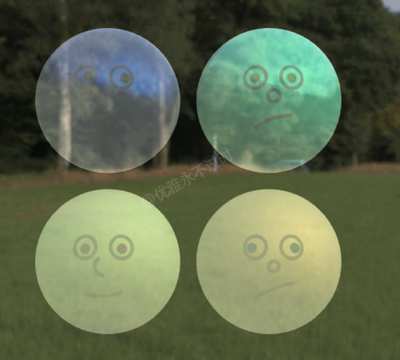
本案例演示 表情 效果:用 Canvas 2D 绘制内容并实时映射为 Three.js 纹理;核心用到 onBeforeCompile、OrbitControls、Canvas。建议先打开文首在线案例查看动态画面,再对照下方源码逐步理解。
核心概念
ShaderMaterial 完全自定义 GLSL;
onBeforeCompile可在内置材质 shader 中注入代码。关注uniforms与 rAF 更新。OrbitControls 轨道旋转缩放;开
enableDamping时每帧需controls.update()。CubeTexture 六面贴图作
scene.background;scene.environment供 PBR 材质反射。
实现步骤
- 搭建 Scene / Camera / Renderer 与 OrbitControls
- 定义材质/shader 与 uniforms,rAF 中更新
- rAF 循环中 update 并 render
代码要点
import * as THREE from "three";
import { OrbitControls } from "three/addons/controls/OrbitControls.js";

const scene = new THREE.Scene()

const camera = new THREE.PerspectiveCamera(30, innerWidth / innerHeight, 1, 1000)

camera.position.set(0, 0, 15)

const renderer = new THREE.WebGLRenderer({ antialias: true })

renderer.setSize(innerWidth, innerHeight)

document.body.appendChild(renderer.domElement)

const controls = new OrbitControls(camera, renderer.domElement)

controls.enableDamping = true

const atlasSize = new THREE.Vector2(2, 2)

renderer.setAnimationLoop(() => {

    controls.update()

    renderer.render(scene, camera)

})

const urls = [0, 1, 2, 3, 4, 5].map(k => ('https://z2586300277.github.io/three-editor/dist/files/scene/skyBox8/' + (k + 1) + '.png'));

const textureCube = new THREE.CubeTextureLoader().load(urls)

scene.background = textureCube

const atlas = ((dim) => {
    const c = document.createElement("canvas");
    const tileSize = 256;
    c.width = tileSize * dim.x;
    c.height = tileSize * dim.y;
    const u = (val) => tileSize * 0.01 * val;
    const ctx = c.getContext("2d");

    ctx.fillStyle = "rgba(255, 255, 255, 1)";
    ctx.fillRect(0, 0, c.width, c.height);

    for (let y = 0; y < dim.y; y++) {
        for (let x = 0; x < dim.x; x++) {
            generateSilly(x, y);
        }
    }

    const tex = new THREE.CanvasTexture(c);
    tex.colorSpace = "srgb";
    tex.anisotropy = renderer.capabilities.getMaxAnisotropy();
    return tex;

    function generateSilly(x, y) {
        ctx.save();
        ctx.translate((x + 0.5) * tileSize, (y + 0.5) * tileSize);
        // eyes
        ctx.lineWidth = u(5);
        ctx.lineCap = "round";
        ctx.strokeStyle = "rgba(127, 127, 127, 1)";
        drawEyes(25, -25, 15);
        drawNose();
        drawMouth();
        ctx.restore();
    }

    function drawMouth() {
        let p1 = [-25, Math.random() * 25];
        let p2 = [-10 + Math.random() * 20, Math.random() * 25];
        let p3 = [25, Math.random() * 25];
        ctx.beginPath();
        let yShift = 20;
        ctx.moveTo(u(p1[0]), u(yShift + p1[1]));
        ctx.quadraticCurveTo(
            u(p2[0]),
            u(yShift + p2[1]),
            u(p3[0]),
            u(yShift + p3[1])
        );
        ctx.stroke();
    }

    function drawNose() {
        ctx.beginPath();
        let arcStart = Math.random() * Math.PI * 2;
        let arcEnd = arcStart + (Math.random() * 0.75 + 0.25) * Math.PI * 2;
        ctx.arc(0, 0, u(Math.random() * 10 + 5), arcStart, arcEnd);
        ctx.stroke();
    }

    function drawEyes(x, y, radius) {
        let eyeSymmX = Math.sign(Math.random() - 0.5);
        let eyeSymmY = Math.sign(Math.random() - 0.5);
        //left
        ctx.fillStyle = "rgba(255, 255, 255, 1)";
        ctx.beginPath();
        ctx.arc(-u(x), u(y), u(radius), 0, Math.PI * 2);
        ctx.fill();
        ctx.stroke();
        // pupil
        let dir = [Math.random() - 0.5, Math.random() - 0.5];
        let dirL = Math.hypot(dir[0], dir[1]);
        let dirN = [dir[0] / dirL, dir[1] / dirL];
        let pupilShift = Math.random() * 5;
        let finalDir = { x: dirN[0] * pupilShift, y: dirN[1] * pupilShift };
        let pupilR = 7;
        let pupilColor = `hsla(${Math.random() * 360}, 100%, 25%, 1)`;
        //console.log(finalDir);
        ctx.fillStyle = pupilColor;
        ctx.beginPath();
        ctx.arc(-u(x + finalDir.x), u(y + finalDir.y), u(pupilR), 0, Math.PI * 2);
        ctx.fill();

        // right
        ctx.fillStyle = "rgba(255, 255, 255, 1)";
        ctx.beginPath();
        ctx.arc(u(x), u(y), u(radius), 0, Math.PI * 2);
        ctx.fill();
        ctx.stroke();
        // pupil
        ctx.fillStyle = pupilColor;
        ctx.beginPath();
        ctx.arc(
            u(x + finalDir.x * eyeSymmX),
            u(y + finalDir.y * eyeSymmY),
            u(pupilR),
            0,
            Math.PI * 2
        );
        ctx.fill();
    }
})(atlasSize);

for (let y = 0; y < atlasSize.y; y++) {
    for (let x = 0; x < atlasSize.x; x++) {
        let mesh = new THREE.Mesh(
            new THREE.SphereGeometry(0.9, 64, 32),
            new THREE.MeshStandardMaterial({
                metalness: Math.random(),
                roughness: Math.random(),
                emissive: 0xffffff,
                emissiveIntensity: 0.05,
                envMap: textureCube,
                color: 0xffffff * Math.random(),
                blending: THREE.AdditiveBlending,
                map: atlas,
                onBeforeCompile: shader => {
                    shader.uniforms.atlasSize = { value: atlasSize };
                    shader.uniforms.tile = { value: new THREE.Vector2(x, y) }
                    shader.fragmentShader = `
                        uniform vec2 atlasSize;
                        uniform vec2 tile;
                        ${shader.fragmentShader}
                    `.replace(
                        `#include <map_fragment>`,
                        `
                        vec2 mUV = vMapUv;
                        vec2 centerUV = ((mUV - 0.5) * vec2(2., 1.) + vec2(0.5, 0.)) * PI;
                        mUV = centerUV + 0.5;
                        vec2 atlasTile = 1. / atlasSize;

                        mUV = clamp((mUV + tile) * atlasTile, vec2(0.), vec2(1.));

                        #ifdef USE_MAP

                        vec4 sampledDiffuseColor = texture2D( map, mUV );

                        #ifdef DECODE_VIDEO_TEXTURE

                        // use inline sRGB decode until browsers properly support SRGB8_ALPHA8 with video textures (#26516)

                        sampledDiffuseColor = vec4(
                            mix(
                            pow(
                                sampledDiffuseColor.rgb * 0.9478672986 + vec3( 0.0521327014 ), vec3( 2.4 )
                            ),
                            sampledDiffuseColor.rgb * 0.0773993808,
                            vec3( lessThanEqual( sampledDiffuseColor.rgb, vec3( 0.04045 ) ) )
                            )
                            , sampledDiffuseColor.w
                        );
                        #endif
                        vec2 absUV = abs(centerUV);
                        diffuseColor *= mix(sampledDiffuseColor, vec4(1), step(0.5, max(absUV.x, absUV.y)));
                    #endif`
                    )
                }
            })
        );
        mesh.position.set(
            (-(atlasSize.x - 1) * 0.5 + x) * 2,
            (-(atlasSize.y - 1) * 0.5 + y) * 2,
            0
        );
        scene.add(mesh);
    }
}
完整源码:GitHub
小结
- 本文提供 表情 完整 Three.js 源码与在线 Demo,建议先运行案例再改 uniform/参数做二次实验
- 更多 Three.js 实战案例见 three-cesium-examples 合集 与 GitHub 开源仓库