交通线路 · Transport Line · ▶ 在线运行案例
案例合集: 三维可视化功能案例(threehub.cn)
开源仓库github地址: https://github.com/z2586300277/three-cesium-examples
**400个案例代码: ** 网盘链接
你将学到什么
- Scene / Camera / Renderer 标准渲染管线搭建
- 案例完整源码结构与可复用初始化模板
效果说明
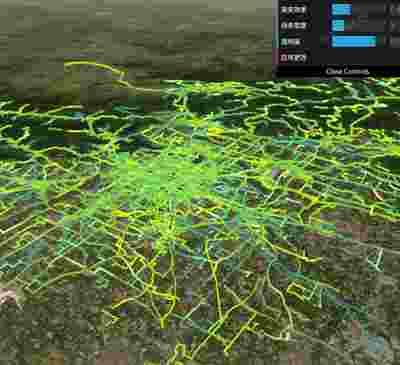
本案例演示 交通线路 效果:基于 WebGL 实现「交通线路」可视化效果,附完整可运行源码。建议先打开文首在线案例查看动态画面,再对照下方源码逐步理解。
核心概念
Viewer 封装地球、相机、图层;可关闭 animation/timeline 等 UI 精简界面。
ImageryLayer 叠加 XYZ/WMTS/ArcGIS 等底图,
imageryLayers.add/remove管理。
实现步骤
- 初始化
Cesium.Viewer与底图图层 - 添加 Entity / Primitive / DataSource 等业务对象
- 按需
camera.flyTo定位视角
代码要点
import * as Cesium from 'cesium'
import * as dat from 'dat.gui'

// 注册自定义流动线材质
function registerFlowLineMaterial() {
    Cesium.Material.PolylineFlowType = 'PolylineFlow';
    Cesium.Material.PolylineFlowSource = `
        uniform vec4 color;
        uniform float speed;
        uniform float percent;
        uniform float gradient;

        czm_material czm_getMaterial(czm_materialInput materialInput) {
            czm_material material = czm_getDefaultMaterial(materialInput);

            // 获取纹理坐标
            float st = materialInput.st.s;

            // 计算流动效果
            float time = czm_frameNumber * speed / 1000.0;
            float currentPos = fract(time - st);

            // 计算流动边缘
            float trailPos = smoothstep(0.0, percent, currentPos);
            float glowPos = smoothstep(0.0, gradient * percent, currentPos) *
                           smoothstep(percent, percent * (1.0 - gradient), currentPos);

            // 计算颜色
            vec4 trailColor = color;
            vec4 glowColor = vec4(color.rgb * 1.5, color.a * 0.5);

            material.diffuse = color.rgb;
            material.alpha = trailPos * color.a;
            material.emission = glowPos * glowColor.rgb;

            return material;
        }
    `;

    // 修改着色器代码,增加更丰富的视觉效果
    Cesium.Material.PolylineFlowEnhancedType = 'PolylineFlowEnhanced';
    Cesium.Material.PolylineFlowEnhancedSource = `
        uniform vec4 color;
        uniform float speed;
        uniform float percent;
        uniform float gradient;
        uniform float pulse;

        czm_material czm_getMaterial(czm_materialInput materialInput) {
            czm_material material = czm_getDefaultMaterial(materialInput);

            // 获取纹理坐标
            float st = materialInput.st.s;

            // 计算流动效果
            float time = czm_frameNumber * speed / 1000.0;
            float currentPos = fract(time - st);

            // 增加脉冲动画效果
            float pulseEffect = 1.0 + 0.2 * sin(time * 3.14 * pulse);

            // 计算流动边缘 - 增强平滑度
            float trailPos = smoothstep(0.0, percent * pulseEffect, currentPos);
            float glowPos = smoothstep(0.0, gradient * percent, currentPos) *
                          smoothstep(percent, percent * (1.0 - gradient), currentPos);

            // 增强发光效果和渐变
            vec4 trailColor = color;
            vec4 glowColor = vec4(color.rgb * 1.8, color.a * 0.7);

            // 边缘发光增强
            float edgeGlow = smoothstep(0.4, 0.5, abs(materialInput.st.t - 0.5)) * 0.5;

            material.diffuse = mix(color.rgb, color.rgb * 1.2, edgeGlow);
            material.alpha = trailPos * color.a;
            material.emission = (glowPos * glowColor.rgb) + (edgeGlow * color.rgb);

            return material;
        }
    `;

    Cesium.Material._materialCache.addMaterial(Cesium.Material.PolylineFlowType, {
        fabric: {
            type: Cesium.Material.PolylineFlowType,
            uniforms: {
                color: new Cesium.Color(1.0, 0.0, 0.0, 0.7),
                speed: 5.0,
                percent: 0.15,
                gradient: 0.4
            },
            source: Cesium.Material.PolylineFlowSource
        },
        translucent: function () {
            return true;
        }
    });

    // 注册增强版流动线材质
    Cesium.Material._materialCache.addMaterial(Cesium.Material.PolylineFlowEnhancedType, {
        fabric: {
            type: Cesium.Material.PolylineFlowEnhancedType,
            uniforms: {
                color: new Cesium.Color(0.8, 1.0, 0.0, 0.9),
                speed: 7.0,
                percent: 0.15,
                gradient: 0.4,
                pulse: 0.5
            },
            source: Cesium.Material.PolylineFlowEnhancedSource
        },
        translucent: function () {
            return true;
        }
    });
}

// 注册材质
registerFlowLineMaterial();

const box = document.getElementById('box')

const viewer = new Cesium.Viewer(box, {

    animation: false,//是否创建动画小器件,左下角仪表

    baseLayerPicker: false,//是否显示图层选择器,右上角图层选择按钮

    baseLayer: Cesium.ImageryLayer.fromProviderAsync(Cesium.ArcGisMapServerImageryProvider.fromUrl('https://server.arcgisonline.com/arcgis/rest/services/World_Imagery/MapServer')),

    fullscreenButton: false,//是否显示全屏按钮,右下角全屏选择按钮

    timeline: false,//是否显示时间轴

    infoBox: false,//是否显示信息框

})

let primitives = [];

viewer.scene.camera.setView({
    destination: {
        x: -2264713.773444937,
        y: 4437097.6365463445,
        z: 4052169.8549779626,
    },
    orientation: {
        heading: 5.625615618387119,
        pitch: -0.5513619022102629,
        roll: 0.00001297575603054213,
    },
});
loadLinesData();

//加载数据
function loadLinesData() {
    let url = FILE_HOST + "files/json/jiaotong.json";
    Cesium.Resource.fetchJson(url).then((data) => {
        var busLines = [];
        data.map(function (busLine, idx) {
            var prevPt;
            var points = [];
            for (var i = 0; i < busLine.length; i += 2) {
                var pt = [busLine[i], busLine[i + 1]];
                if (i > 0) {
                    pt = [prevPt[0] + pt[0], prevPt[1] + pt[1]];
                }
                prevPt = pt;

                var longitude = pt[0] / 1e4;
                var latitude = pt[1] / 1e4;
                points.push(longitude);
                points.push(latitude);
            }

            busLines.push({
                positions: points,
                color: new Cesium.Color(
                    Math.random() * 0.5 + 0.5,
                    Math.random() * 0.8 + 0.2,
                    0.0,
                    1.0
                ),
                width: 2.0,
            });
        });
        addLineDatasPrimitive(busLines);

    });
}

// 预定义颜色主题
const colorThemes = [
    {
        name: '黄绿色系', colors: [
            new Cesium.Color(0.8, 1.0, 0.0, 0.9),
            new Cesium.Color(0.6, 0.8, 0.2, 0.9),
            new Cesium.Color(0.4, 0.7, 0.4, 0.9),
            new Cesium.Color(0.2, 0.6, 0.6, 0.9)
        ]
    },
    {
        name: '蓝色系', colors: [
            new Cesium.Color(0.0, 0.5, 1.0, 0.8),
            new Cesium.Color(0.0, 0.7, 1.0, 0.8),
            new Cesium.Color(0.1, 0.6, 0.9, 0.8),
            new Cesium.Color(0.2, 0.5, 0.8, 0.8)
        ]
    },
    {
        name: '红色系', colors: [
            new Cesium.Color(1.0, 0.2, 0.2, 0.8),
            new Cesium.Color(0.9, 0.3, 0.1, 0.8),
            new Cesium.Color(0.8, 0.2, 0.2, 0.8),
            new Cesium.Color(1.0, 0.4, 0.3, 0.8)
        ]
    },
    {
        name: '绿色系', colors: [
            new Cesium.Color(0.1, 0.8, 0.4, 0.8),
            new Cesium.Color(0.2, 0.7, 0.5, 0.8),
            new Cesium.Color(0.0, 0.6, 0.3, 0.8),
            new Cesium.Color(0.3, 0.8, 0.3, 0.8)
        ]
    },
    {
        name: '彩虹系', colors: [
            new Cesium.Color(1.0, 0.0, 0.0, 0.8),
            new Cesium.Color(1.0, 0.7, 0.0, 0.8),
            new Cesium.Color(0.0, 0.7, 0.2, 0.8),
            new Cesium.Color(0.0, 0.5, 1.0, 0.8),
            new Cesium.Color(0.6, 0.0, 0.8, 0.8)
        ]
    },

];

//添加到场景 Primitive 方式
function addLineDatasPrimitive(busLines) {
    let scene = viewer.scene;

    // 创建GUI控制面板
    const gui = new dat.GUI();

    // 效果控制参数
    const effectControls = {
        colorTheme: '黄绿色系',
        speed: 5.0,
        percent: 0.15,
        gradient: 0.4,
        width: 3.0,
        opacity: 0.8,
        applyChanges: function () {
            updateLines();
        }
    };

    // 添加控制选项
    gui.add(effectControls, 'colorTheme', colorThemes.map(theme => theme.name)).onChange(updateLines)
        .name('颜色主题');
    gui.add(effectControls, 'speed', 1, 20).name('流动速度');
    gui.add(effectControls, 'percent', 0.05, 0.5).name('流动长度');
    gui.add(effectControls, 'gradient', 0.1, 1.0).name('渐变效果');
    gui.add(effectControls, 'width', 1, 10).name('线条宽度');
    gui.add(effectControls, 'opacity', 0, 1).name('透明度');
    gui.add(effectControls, 'applyChanges').name('应用更改');

    // 更新或创建所有线条
    function updateLines() {
        // 清除现有线条
        primitives.forEach(p => scene.primitives.remove(p));
        primitives = [];

        // 获取当前颜色主题
        const currentTheme = colorThemes.find(t => t.name === effectControls.colorTheme);
        const colors = currentTheme.colors;

        // 为每条线创建材质
        busLines.forEach((line, index) => {
            // 从主题中循环选择颜色
            const colorIndex = index % colors.length;
            const lineColor = colors[colorIndex].clone();
            lineColor.alpha = effectControls.opacity;

            // 创建流动线材质
            const material = Cesium.Material.fromType(Cesium.Material.PolylineFlowType, {
                color: lineColor,
                speed: effectControls.speed,
                percent: effectControls.percent,
                gradient: effectControls.gradient
            });

            // 创建线条
            const primitive = new Cesium.Primitive({
                appearance: new Cesium.PolylineMaterialAppearance({
                    material: material
                }),
                geometryInstances: new Cesium.GeometryInstance({
                    geometry: new Cesium.PolylineGeometry({
                        positions: Cesium.Cartesian3.fromDegreesArray(line.positions),
                        width: effectControls.width,
                        vertexFormat: Cesium.PolylineMaterialAppearance.VERTEX_FORMAT
                    })
                })
            });

            primitives.push(scene.primitives.add(primitive));
        });
    }

    // 初始化线条
    updateLines();
}
完整源码:GitHub
小结
- 本文提供 交通线路 完整 Cesium.js 源码与在线 Demo,建议先运行案例再改 uniform/参数做二次实验
- 更多 Cesium.js 实战案例见 three-cesium-examples 合集 与 GitHub 开源仓库