实例化渲染 · Instance Render · ▶ 在线运行案例
案例合集: 三维可视化功能案例(threehub.cn)
开源仓库github地址: https://github.com/z2586300277/three-cesium-examples
**400个案例代码: ** 网盘链接
你将学到什么
- Scene / Camera / Renderer 标准渲染管线搭建
- 案例完整源码结构与可复用初始化模板
效果说明
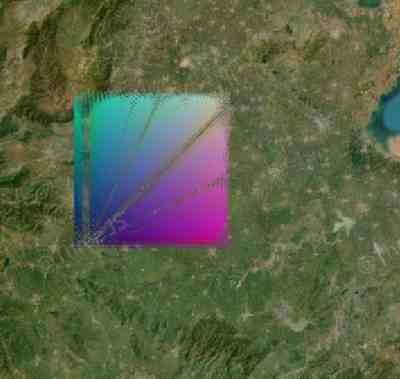
本案例演示 实例化渲染 效果:创建 DrawCommand。建议先打开文首在线案例查看动态画面,再对照下方源码逐步理解。
核心概念
- Viewer 聚合 Scene、Camera、Clock 与渲染循环,是 Cesium 应用入口。
- 阅读下方完整源码时,建议从
init/load/animate三条主线入手,再深入 shader 与工具函数。
实现步骤
- 创建 Viewer,配置地形/影像(若案例需要)并设置初始相机
- 在
requestAnimationFrame循环中更新状态并 render(Cesium 为viewer.render或自动渲染)
代码要点
import * as Cesium from 'cesium'

const box = document.getElementById('box')

const viewer = new Cesium.Viewer(box, {

    animation: false,//是否创建动画小器件,左下角仪表

    baseLayerPicker: false,//是否显示图层选择器,右上角图层选择按钮

    baseLayer: Cesium.ImageryLayer.fromProviderAsync(Cesium.ArcGisMapServerImageryProvider.fromUrl('https://server.arcgisonline.com/arcgis/rest/services/World_Imagery/MapServer')),

    fullscreenButton: false,//是否显示全屏按钮,右下角全屏选择按钮

    timeline: false,//是否显示时间轴

    infoBox: false,//是否显示信息框

})


const defaultvs = `
    in vec3 position;
    in vec3 normal;
    out vec3 v_color;
    out vec3 v_normal;
    uniform int irow;
    void main(){
    float instanceId = float(gl_InstanceID);

    int rows = irow * irow;
    float dz = float(gl_InstanceID / rows);
    int sub = gl_InstanceID % rows;

    float dx = float(sub / irow);
    float dy = float(sub % irow);
    float d = 2560.;
    vec3 tp = position + vec3(d * dx, d * dy, dz * d);
    v_color = vec3(dx / 128., dy / 128., dz / 128.);

    gl_Position = czm_projection  * czm_modelView * vec4( tp , 1. );
    }
`;
const defaultfs = `
    uniform vec3 color;
    in vec3 v_color;
    out vec4 out_fragColor;
    void main(){
    out_fragColor=vec4( v_color , 1. );
    }
`;

export default class GridPrimitive {
    constructor(modelMatrix, vs, fs, row, uniformMap) {
        this.modelMatrix = modelMatrix || Cesium.Matrix4.IDENTITY.clone()
        this.drawCommand = null;

        this.vs = vs || defaultvs;
        this.fs = fs || defaultfs;
        this.row = row || 10;
        this.uniformMap = uniformMap || {};
    }

    isDestroyed() {
        return false;
    }

    /**
     * 创建 DrawCommand
     * @param {Cesium.Context} context
     */
    createCommand(context) {

        var modelMatrix = this.modelMatrix;

        var box = new Cesium.BoxGeometry({
            // vertexFormat: Cesium.VertexFormat.POSITION_ONLY,
            maximum: new Cesium.Cartesian3(250.0, 250.0, 250.0),
            minimum: new Cesium.Cartesian3(-250.0, -250.0, -250.0)
        });
        var geometry = Cesium.BoxGeometry.createGeometry(box);

        var attributeLocations = Cesium.GeometryPipeline.createAttributeLocations(geometry)

        var va = Cesium.VertexArray.fromGeometry({
            context: context,
            geometry: geometry,
            attributeLocations: attributeLocations,
            indexBuffer: Cesium.Buffer.createIndexBuffer({
                context: context,
                typedArray: geometry.indices,
                indexDatatype: Cesium.IndexDatatype.UNSIGNED_SHORT,
                usage: Cesium.BufferUsage.STATIC_DRAW
            }),
        });

        const { vs, fs } = this;

        var shaderProgram = Cesium.ShaderProgram.fromCache({
            context: context,
            vertexShaderSource: vs,
            fragmentShaderSource: fs,
            attributeLocations: attributeLocations
        })

        const row = this.row;
        const instanceCount = row * row * row;

        const uniformMap = this.uniformMap;
        uniformMap.color = () => Cesium.Color.RED;
        uniformMap.irow = () => row;

        var renderState = Cesium.RenderState.fromCache({
            cull: {
                enabled: true,
                face: Cesium.CullFace.BACK
            },
            depthTest: {
                enabled: true
            }
        })

        this.drawCommand = new Cesium.DrawCommand({
            modelMatrix: modelMatrix,
            vertexArray: va,
            shaderProgram: shaderProgram,
            uniformMap: uniformMap,
            renderState: renderState,
            pass: Cesium.Pass.OPAQUE,
            instanceCount: instanceCount
        })
    }

    /**
     * 实现Primitive接口,供Cesium内部在每一帧中调用
     * @param {Cesium.FrameState} frameState
     */
    update(frameState) {
        if (!this.drawCommand) {
            this.createCommand(frameState.context)
        }
        frameState.commandList.push(this.drawCommand)

        window.curdr = this.drawCommand;
    }
}


var origin = Cesium.Cartesian3.fromDegrees(113, 33, 250 / 2)
var modelMatrix = Cesium.Transforms.eastNorthUpToFixedFrame(origin)

const row = 100;
const instanceCount = row * row * row;
document.title = `Instance-${(instanceCount / 10000).toFixed(1)}w-DrawCommand`;
var primitive = new GridPrimitive(modelMatrix, null, null, row);
viewer.scene.primitives.add(primitive)

// 设置相机位置以查看模型
viewer.camera.flyTo({
    destination: Cesium.Cartesian3.fromDegrees(113, 33, 1600000),
    orientation: {
        heading: Cesium.Math.toRadians(0),
        pitch: Cesium.Math.toRadians(-90),
        roll: 0.0
    }
});
完整源码:GitHub
小结
- 本文提供 实例化渲染 完整 Cesium.js 源码与在线 Demo,建议先运行案例再改 uniform/参数做二次实验
- 更多 Cesium.js 实战案例见 three-cesium-examples 合集 与 GitHub 开源仓库